
Spark on AmpereOne® M Processors Reference Architecture
Spark on AmpereOne® M Processors Reference Architecture
Introduction
Arm technology now powers a broad spectrum of on-premises and cloud server workloads. Building on Ampere Computing's previous reference architecture which demonstrated that Apache Spark on Ampere® Altra® – 128C (Ampere Altra 128 Cores) processors delivers superior performance per rack, lower power consumption, and optimized CapEx and OpEx, this paper evaluates and extends that analysis to showcase Spark performance on the latest generation of AmpereOne® M processors.
Scope and Audience
This document describes the process of setting up, tuning, and evaluating Spark performance using a testbed powered by AmpereOne® M processors. It includes a comparative analysis of the performance benefits of the 12-channel AmpereOne® M processors relative to its predecessors, specifically Ampere Altra – 128C processors. Additionally, the paper examines the Spark performance improvements achieved by using a 64KB page-size kernel over standard 4KB page-size kernels.
We outline the installation and tuning procedures for deploying Spark on both single-node and multi-node clusters. These recommendations are intended as general guidelines, and configuration parameters can be further optimized based on specific workloads and use cases.
This document is intended for sales engineers, IT and cloud architects, IT and cloud managers, and customers seeking to leverage the performance and power efficiency advantages of Ampere Arm servers across their IT infrastructure. It provides practical guidance and technical insights for professionals interested in deploying and optimizing Arm-based Spark solutions.
AmpereOne® M Processors
The AmpereOne M processor is part of the AmpereOne® family of high-performance server-class processors, designed to deliver exceptional performance for AI Compute and a wide range of mainstream data center workloads. Data-intensive applications such as Hadoop and Apache Spark benefit directly from the 12 DDR5 memory channels, which provide the high memory bandwidth required for large-scale data processing.
AmpereOne M processors introduce a new platform architecture with a higher core count and additional memory channels, differentiating it from earlier Ampere platforms while preserving Ampere’s Cloud Native processing principles.
Designed from ground up for cloud efficiency and predictable scaling, AmpereOne M processors employ a one-to-one mapping between vCPUs and physical cores, ensuring consistent performance without resource contention. With up to 192 single-threaded cores and twelve DDR5 channels delivering 5600 MT/s, AmpereOne M processors deliver a sustained throughput required for demanding workloads such as Spark, though also including modern AI inference relying on Large Language Models (LLM).
AmpereOne M processors also emphasizes exceptional performance-per-watt helping reduce operational costs, energy consumption, and cooling requirements in modern data centers.
Apache Spark
Apache Spark is a unified data processing and analytics framework used for data engineering, data science, and machine learning workloads. It can operate on a single-node or scale across large clusters, making it suitable for processing large and complex datasets. By leveraging distributed computing, Spark efficiently parallelizes data processing tasks across multiple nodes, either independently or in combination with other distributed computing systems.
Spark utilizes in-memory caching, which allows for quick access to data and optimized query execution, enabling fast analytic queries on datasets of any size. The framework provides APIs in popular programming languages such as Java, Scala, Python, and R, making it accessible to the broad developer community. Spark supports various workloads, including real-time analytics, batch processing, interactive queries, and machine learning, offering a comprehensive solution for modern data processing needs.
Spark supports multiple deployment models. It can run as a standalone cluster or integrate with cluster management and orchestration platforms such as Hadoop YARN, Kubernetes and Docker. This flexibility allows Spark to adapt to diverse infrastructure environments and workload requirements.
Spark Architecture and Components
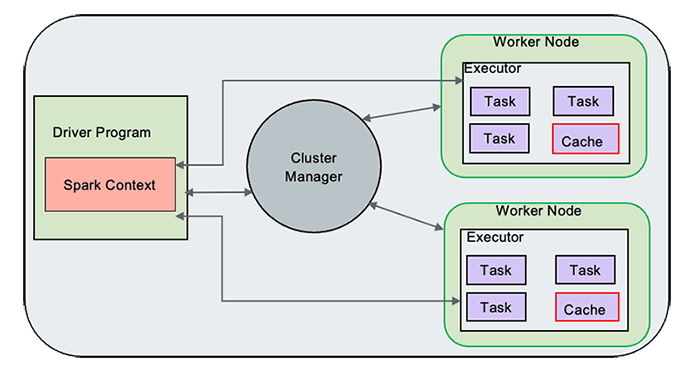
Figure 1
Spark Driver
The Spark Driver serves as the central controller of the Spark execution engine and is responsible for managing the overall state of the Spark cluster. It interacts with the cluster manager to acquire the necessary resources such as virtual CPUs (vCPUs) and memory. Once the resources are obtained, the Driver launches the executors, which are responsible for executing the actual tasks of the Spark application. Additionally, the Spark Driver plays a crucial role in maintaining the state of the application running on the cluster. It keeps track of various important information, such as the execution plan, task scheduling, and the data transformations and actions to be performed. The Driver coordinates the execution of tasks across the available executors, ensuring efficient data processing and computation.
Spark Driver, hence, acts as a control unit orchestrating the execution of Spark application on the cluster and maintaining the necessary states and communication with the cluster manager and executors.
Spark Executors
Spark Executors are responsible for executing the tasks assigned to them by the Spark Driver. Once the Driver distributes the tasks across the available Executors, each Executor independently processes its assigned tasks. The Executors run these tasks in parallel, leveraging the resources allocated to them, such as CPU and memory. They perform the necessary computations, transformations, and actions specified in the Spark application code. This includes operations like data transformations, filtering, aggregations, and machine learning algorithms, depending on the nature of the tasks. During the execution of the tasks, the Executors communicate with the Driver, providing updates on their progress and reporting the results of each task.
Cluster Manager
The Cluster Manager is responsible for maintaining the cluster of machines on which the Spark applications run. It handles resource allocation, scheduling, and management of the Spark Driver and Executors, ensuring efficient execution of Spark applications on the available cluster resources.
When a Spark application is submitted, the Driver communicates with the Custer Manager to request the necessary resources, such as CPU, memory, and storage, to run the application. It ensures that the resources are distributed effectively to meet the requirements of the Spark application. This includes tasks such as assigning containers or worker nodes to execute the Spark Executors and ensuring that the required dependencies and configurations are in place.
Spark RDD
Spark uses a concept called Resilient Distributed Dataset (RDD), an abstraction that represents an immutable collection of objects that can be split across a cluster. RDDs can be created from various data sources, including SQL databases and NoSQL stores. Spark Core, which is built upon the RDD model, provides essential functionalities such as mapping and reducing operations. It also offers built-in support for joining data sets, filtering, sampling, and aggregation, making it a powerful tool for data processing. When executing tasks, Spark splits them into smaller subtasks and distributes them across multiple executor processes running on the cluster. This enables the parallel execution of tasks across the available computational resources, resulting in improved performance and scalability.
Spark Core
Spark Core serves as the underlying execution engine for the Spark platform, forming the basis for all other Spark functionality. It offers powerful capabilities such as in-memory computing and the ability to reference datasets stored on external storage systems. One of the key components of Spark Core is the resilient distributed dataset (RDD), which serves as the primary programming abstraction in Spark. RDDs enable fault-tolerant and distributed data processing across a cluster.
Spark Core provides a wide range of APIs for creating, manipulating, and transforming RDDs. These APIs are available in multiple programming languages including Java, Python, Scala, and R. This flexibility allows developers to work with Spark Core using their preferred language and leverages the rich ecosystem of libraries and tools available in those languages.
Spark Scheduler
The Spark Scheduler is a vital component responsible for task scheduling and execution. It uses a Directed Acyclic Graph (DAG) and employs a task-oriented approach for scheduling tasks. The Scheduler analyzes the dependencies between different stages and tasks of a Spark application, represented by the DAG. It determines the optimal order in which tasks should be executed to achieve efficient computation and minimize data movement across the cluster.
By understanding the dependencies and requirements of each task, the Scheduler assigns resources, such as CPU and memory, to the tasks. It considers factors like data locality, where possible, to reduce network overhead and improve performance. The task-oriented approach of the Spark Scheduler allows it to break down the application into smaller, manageable tasks and distribute them across the available resources. This enables parallel execution and efficient utilization of the cluster's computing power.
Spark SQL
Spark SQL is a widely used component of Apache Spark that facilitates the creation of applications for processing structured data. It adopts a data frame approach and allows efficient and flexible data manipulation. One of the key features of Spark SQL is its ability to interface with various data storage systems. It provides built-in support for reading and writing data from and to different datastores, including JSON, HDFS, JDBC, and Parquet. This makes it easy to work with structured data residing in different formats and storage systems.
Additionally, Spark SQL extends its connectivity beyond the built-in datastores. It offers connectors that enable integration with other popular data stores such as MongoDB, Cassandra, and HBase. These connectors allow users to seamlessly interact with, and process data stored in these systems using Spark SQL's powerful querying and processing capabilities.
Spark MLlib
In addition to its core functionalities, Apache Spark includes bundled libraries for machine learning and graph analysis techniques. One such library is MLlib, which provides a comprehensive framework for developing machine learning pipelines.
MLlib simplifies the implementation of machine learning workflows by offering a wide range of tools and algorithms. It simplifies the implementation of feature extraction and transformations on structured datasets and offers a wide range of machine learning algorithms. MLlib empowers developers to build scalable and efficient machine learning workflows, enabling them to leverage the power of Spark for advanced analytics and data-driven applications.
Distributed Storage
Spark does not provide its own distributed file system. However, it can effectively utilize existing distributed file systems to store and access large datasets across multiple servers.
One commonly used distributed file system with Spark is the Hadoop Distributed File System (HDFS). HDFS allows for the distribution of files across a cluster of machines, organizing data into consistent sets of blocks stored on each node. Spark can leverage HDFS to efficiently read and write data during its processing tasks. When Spark processes data, it typically copies the required data from the distributed file system into its memory. By doing so, Spark reduces the need for frequent interactions with the underlying file system, resulting in faster processing compared to traditional Hadoop MapReduce jobs. As the dataset size increases, additional servers with local disks can be added to the distributed file system, allowing for horizontal scalability and improved performance.
Spark Jobs, Stages and Tasks
In a Spark application, the execution flow is organized into a hierarchical structure consisting of Jobs, Stages, and Tasks.
A Job represents a high-level unit of work within a Spark application. It can be seen as a complete computation that needs to be performed, involving multiple Stages and transformations on the input data.
A Stage is a logical division of tasks that share the same shuffle dependencies, meaning they need to exchange data with each other during execution. Stages are created when there is a shuffle operation, such as a groupBy or a join, that requires data to be redistributed across the cluster.
Within each Stage, there are multiple Tasks. A Task represents the smallest unit of work in Spark, representing a single operation that can be executed on a partition of the data. Tasks are typically executed in parallel across multiple nodes in the cluster, with each node responsible for processing a subset of the data.
Spark intelligently partitions the data and schedules Tasks across the cluster to maximize parallelism and optimize performance. It automatically determines the optimal number of Tasks and assigns them to available resources, considering factors such as data locality to minimize data shuffling between nodes. Spark handles the management and coordination of Tasks within each stage, ensuring that they are executed efficiently and leveraging the parallel processing capabilities of the cluster.
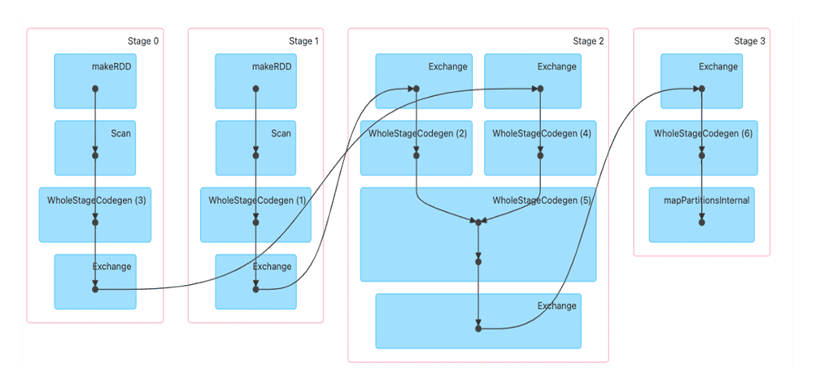
Figure 2
Shuffle boundaries introduce a barrier where Stages/Tasks must wait for the previous stage to finish before they fetch map outputs. In the above diagram, Stage0 and Stage1 are executed in parallel, while Stage2 and Stage3 are executed sequentially. Hence, Stage2 has to wait until both Stage0 and Stage1 are complete. This execution plan is evaluated by Spark.
Spark Test Bed
Spark cluster was set up for performance benchmarking.
Equipment Under Test
Cluster Nodes: 3
CPU: AmpereOne® M
Sockets/Node: 1
Cores/Socket: 192
Threads/Socket: 192
CPU Speed: 3200 MHz
Memory Channels: 12
Memory/Node: 768 GB (12 x 64GB DDR5-5600, 1DPC)
Network Card/Node: 1 x Mellanox ConnectX-6
OS Storage/Node: 1 x Samsung 960GB M.2
Data Storage/Node: 4 x Micron 7450 Gen 4 NVME, 3.84 TB
Kernel Version: 6.8.0-85
Operating System: Ubuntu 24.04.3
YARN Version: 3.3.6
Spark Version: 3.5.7
JDK Version: JDK 17
Spark Installation and Cluster Setup
We setup the cluster with an HDFS file system. Hence, we installed Spark as a Hadoop user and configured the disks for HDFS.
OS Install:
The majority of modern open-source and enterprise-supported Linux distributions offer full support for the AArch64 architecture. To install your chosen operating system, use the server Kernel-based Virtual Machine (KVM) console to map or attach the OS installation media, and then follow the standard installation procedure.
Networking Setup:
Set up a public network on one of the available interfaces for client communication. This can be used to log in to any of the servers and where client communication is needed. Set up a private network for communication between the cluster nodes.
Storage Setup:
Choose a drive of your choice for OS to install, clear any old partitions, reformat and choose the disk to install the OS. Here, a Samsung 960 GB drive (M.2) was chosen for the OS installation on each server. Add additional high speed NVME drives to support the HDFS file system.
Create Hadoop User:
Create a user named “hadoop” as part of the OS Install. This user was used for both Hadoop and Spark daemons on the test bed.
Post Install Steps:
Perform the following post install steps on all the nodes on OS after the install.
1. yum or apt update on the nodes.
2. Install packages like dstat, net-tools, lm-sensors, linux-tools-generic, python, sysstat for your monitoring needs.
3. Set up ssh trust between all the nodes.
4. Update /etc/sudoers file for nopasswd for hadoop user.
5. Update /etc/security/ limits.conf per Appendix.
6. Update /etc/sysctl.conf per Appendix.
7. Update scaling governor and hugepages per Appendix.
8. If necessary, make changes to /etc/rc.d to keep the above changes permanent after every reboot.
9. Setup NVMe disks as xfs file system for HDFS.
a. Create a single partition on each of the nvme disks with fdisk or parted.
b. Create file system on each of the created partitions as mkfs.xfs -f /dev/nvme[0-n]n1p1.
c. Create directories for mounting as mkdir -p /root/nvme[0-n]1p1.
d. Update /etc/fstab with entries and mount the file system. The UUID of each partition in fstab, can be extracted from blkid command.
e. Change ownership of these directories to ‘hadoop’ user created earlier.
Spark Install
Download Hadoop 3.3.6 from the Apache website, Spark 3.5.7 from Apache Spark, and JDK11 and JDK17 for Arm64/Aarch64. We will use JDK11 for Hadoop and JDK17 for Spark installs. Extract the tarball files under the hadoop user home directory.
Update Spark and Hadoop configuration files in ~/hadoop/spark/conf and ~/hadoop/etc/hadoop/ and environment parameters in .bashrc per Appendix. Depending on the hardware specifications on cores, memory and disk capacities, these may have to be altered. Update the Workers’ files to include the set of data nodes.
Run the following commands:
hdfs namdenode -format scp -r ~/hadoop <datanodes>:~/hadoop ~/hadoop/sbin/start-all.sh ~/spark/sbin/start-all.sh
This should start Spark Master, Worker and other Hadoop daemons.
Performance Tuning
Spark is a complex system where many components interact across various layers. To achieve optimal performance, several factors must be considered, including BIOS and operating system settings, the network and disk infrastructure, and the specific software stack configuration. Experience with Hadoop and Spark significantly helps in fine-tuning these settings. Keep in mind that performance tuning is an ongoing, iterative process. The parameters in the Appendix are provided as starting reference points, gathered from just a few initial tuning cycles.
Linux
Occasionally, there can be conflicts between the subcomponents of a Linux system, such as the network and disk, which can impact overall performance. The objective is to optimize the system to achieve optimal disk and network throughput and identify and resolve any bottlenecks that may arise.
Network
To evaluate the network infrastructure, the iperf utility can be utilized to conduct stress tests. Adjusting the TX/RX ring buffers and the number of interrupt queues to align with the cores on the NUMA node where the NIC is located can help optimize performance. However, if the BIOS setting is already configured as chipset-ANC in a monolithic manner, these modifications may not be necessary.
Disks
Aligned Partitions: Partitions should be aligned with the storage's physical block boundaries to maximize I/O efficiency. Utilities like parted can be used to create aligned partitions.
I/O Queue Settings: Parameters such as the queue depth and nr_requests (number of requests) can be fine-tuned via the /sys/block/
Filesystem Mount Options: Utilizing the noatime option in the /etc/fstab file is critical for Hadoop & HDFS, as it prevents unnecessary disk writes by disabling the recording of file access timestamps.
The fio (flexible I/O tester) tool is highly effective for benchmarking and validating the performance of the disk subsystem after these changes are implemented.
Spark Configuration Parameters
There are several tunables on Spark. Only a few of them are addressed here. Tune your parameters by observing the resource usage from http://
Using Data Frames over RDD
It is preferred to use Dataset or Data Frames over RDD, that include several optimizations to improve the performance of spark workloads. Spark data frames can handle the data better by storing and managing it efficiently as it maintains the structure of the data and column types.
Using Serialized Data Formats
In Spark jobs, a common scenario involves writing data to a file, which is then read by another job and written to another file for subsequent Spark processing. To optimize this data flow, it is recommended to write the intermediate data into a serialized file format such as Parquet. Using Parquet as the intermediate file format can yield improved performance compared to formats like CSV or JSON. Parquet is a columnar file format designed to accelerate query processing. It organizes data in a columnar manner, allowing for more efficient compression and encoding techniques. This columnar storage format enables faster data access and processing, particularly for operations that involve selecting specific columns or performing aggregations.
By leveraging Parquet as the intermediate file format, Spark jobs can benefit from faster transformation operations. The columnar storage and optimized encoding techniques offered by Parquet, as well as its compatibility to processing frameworks like Hadoop, contribute to improved query performance and reduced data processing time.
Reducing Shuffle Operations
Shuffling is a fundamental Spark operation that reorders data among different executors and nodes. This is necessary for distributed tasks such as joins, grouping, and reductions. This data redistribution is expensive in terms of resources, as it requires considerable disk IO, data packaging, and movement across the network. This is crucial to how Spark works, but can severely reduce performance, if not understood and tuned properly.
The spark.sql.shuffle.partitions configuration parameter is key to managing shuffle behavior. Found in spark-defaults.conf, this setting dictates the number of partitions created during shuffle operations. The optimal value varies significantly, depending on data volume, available CPU cores, and the cluster's memory capacity.
Setting too many partitions results in a large number of smaller output files, potentially increasing overhead. Conversely, too few partitions can lead to individual partitions becoming excessively large, risking out-of-memory errors on executors. Optimizing shuffle performance involves an iterative process, carefully adjusting spark.sql.shuffle.partitions to strike the right balance between partition count and size for your specific workload.
Spark Executor Cores
The number of cores allocated to each Spark Executor is an important consideration for optimal performance. In general, allocating around 5 cores per Executor tends to be a fair allocation when using the Hadoop Distributed File System (HDFS).
When running Spark alongside Hadoop daemons, it is vital to reserve a portion of the available cores for these daemons. This ensures that the Hadoop infrastructure functions smoothly alongside Spark. The remaining cores can then be distributed among the Spark Executors for executing data processing tasks.
By striking a balance between allocating cores to Hadoop daemons and Spark executors, you can ensure that both systems coexist effectively, enabling efficient and parallel processing of data. It is important to adjust the allocation based on the specific requirements of your cluster and workload to achieve optimal performance.
Spark Executor Instances
The number of Spark executor instances represent the total count of executor instances that can be spawned across all worker nodes for data processing. To calculate the total number of cores consumed by a Spark application, you can multiply the number of executors by the cores allocated per executor.
The Spark UI provides information on the actual utilization of cores during task execution, indicating the extent to which the available cores are being utilized. It is recommended to maximize this utilization based on the availability of system resources.
By effectively using the available cores, you can boost your Spark application's processing power and make its overall performance better. It is crucial to look at the resources in your cluster and change the amount of executor instances and cores given to each executor to match. This ensures resources are used effectively and gets the most computational power out of your Spark application.
Executor and Driver Memory
The memory configuration for Spark's Driver and Executors plays a critical role in determining the available memory for these components. It is important to tune these values based on the memory requirements of your Spark application and the memory availability within your YARN scheduler and NodeManager resource allocation parameters.
The Executor's memory refers to the memory allocated for each executor, while the Driver's memory represents the memory allocated for the Spark Driver. These values should be adjusted carefully to ensure optimal performance and avoid memory-related issues.
When tuning the memory configuration, it is essential to consider the overall memory availability in your environment and consider any memory constraints imposed by the YARN scheduler and NodeManager settings. By aligning the memory allocation with the available resources, you can optimize the memory utilization and prevent potential out-of-memory errors or performance degradation (swapping or disk spills).
It is recommended to monitor the memory usage with Spark UI and adjust the configuration iteratively to achieve the best performance for your Spark workload.
Benchmark tools
We used both Intel HiBench and TPC-DS benchmarking tools to measure the performance of the clusters.
TeraSort
We used the HiBench benchmarking tool to measure the TeraSort performance. HiBench is a popular benchmarking suite specifically designed for evaluating the performance of Big Data frameworks, such as Apache Hadoop and Apache Spark. It consists of a set of workload-specific benchmarks that simulate real-world Big Data processing scenarios. For additional information, you can refer to this link.
By running HiBench on the cluster, you can assess and compare their performance in handling various Big Data workloads. The benchmark results can provide insights into factors such as data processing speed, scalability, and resource utilization for each cluster.
1. Update hibench.conf file, like scale, profile, parallelism parameters and list of master and slave nodes.
2. Run ~HiBench/bin/workloads/micro/terasort/prepare/prepare.sh
3. Run ~HiBench/bin/workloads/micro/terasort/spark/run.sh
After executing the above, a file named hibench.report will be generated within the report directory. Additionally, a file named bench.log will contain comprehensive information regarding the execution.
The cluster was using a data set of 3 TB. We measured the total power consumed, CPU power, CPU utilization, and other parameters like disk and network utilization using Grafana, and IPMI tools.
Throughput from the HiBench run was calculated for TeraSort in the following scenarios:
1. Spark running on a single AmpereOne® M node compared with a single node Ampere Altra – 128C (prior generation).
2. Spark running on a single AmpereOne® M node compared with a 3-node AmpereOne® M cluster to measure the scalability.
3. Spark running on a 3-node AmpereOne® M cluster with 64k page size vs 4k page size
TPC-DS
TPC-DS is an industry-standard decision support benchmark that models’ various aspects of a decision support system, encompassing data maintenance and queries. Its purpose is to assist organizations in making informed decisions regarding their technology choices for decision support systems. TPC benchmarks aim to provide objective performance data that is relevant to industry users. For more in-depth information, you can refer to this tpc.org/tpcds/.
Similar to TeraSort testing, we conducted TPC-DS benchmark on AmpereOne® M processors using both single-node and 3-node cluster configurations to compare performance with the prior generation Ampere Altra – 128C processors and to assess scalability. Additional performance evaluations on the AmpereOne® M processor compared to Linux kernels configured with 64KB and 4KB page sizes.
This test also used a 3 TB dataset across the cluster. To gain deeper insights into system performance, we monitored key performance metrics including total system power consumption, CPU power, CPU utilization, and network utilization.
Performance Tests on 3 Node Clusters

We evaluated Spark TeraSort performance using the HiBench tool. The tests were run on one, two and three nodes with AmpereOne M processors, and the earlier values obtained on Ampere Altra – 128C were compared.
From Figure 3 it is evident that there is a 30% benefit with the AmpereOne M processor over the Ampere Altra – 128C processor while running Spark TeraSort. This increase in performance can be attributed to a newer microarchitecture design, an increase in core count (from 128 to 192) and the 12-channel DDR5 design on AmpereOne M CPUs (versus 8-channel DDR4 on Ampere Altra – 128C CPUs).
The output for the 3x nodes configuration as shown in Figure 4 was found to be close to three times the output of a single node.
64k Page Size
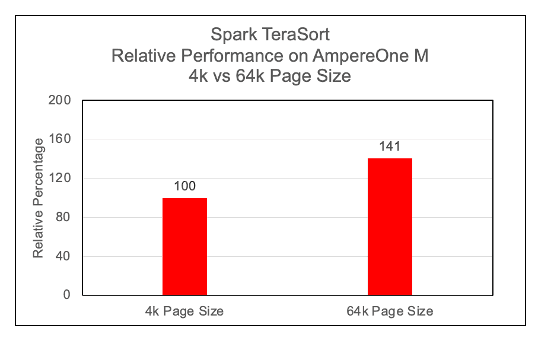
Figure 5
We observed a significant performance increase, approximately 40%, with 64k page size on Arm64 architecture while running Spark TeraSort benchmark. Most modern Linux distributions, support largemem kernels natively. We have not observed any issues while running Spark TeraSort benchmarks on largemem kernels.
Performance per Watt on AmpereOne® M
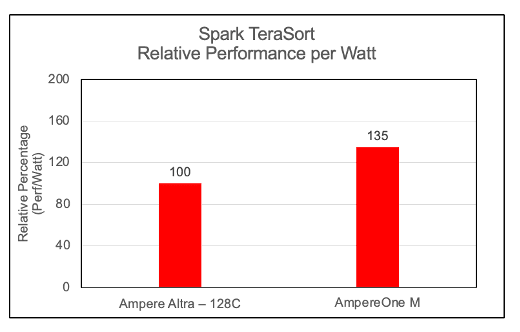
Figure 6
To evaluate the energy efficiency of the cluster, we computed the Performance-per-Watt (Perf/Watt) ratio. This metric is derived by dividing the cluster's measured throughput (megabytes per second) by its total power consumption (watts) during the benchmarking interval. In these assessments, we observed AmpereOne® M performing 35% better over its predecessor on the Spark TeraSort benchmark.
OS Metrics while running TeraSort benchmark
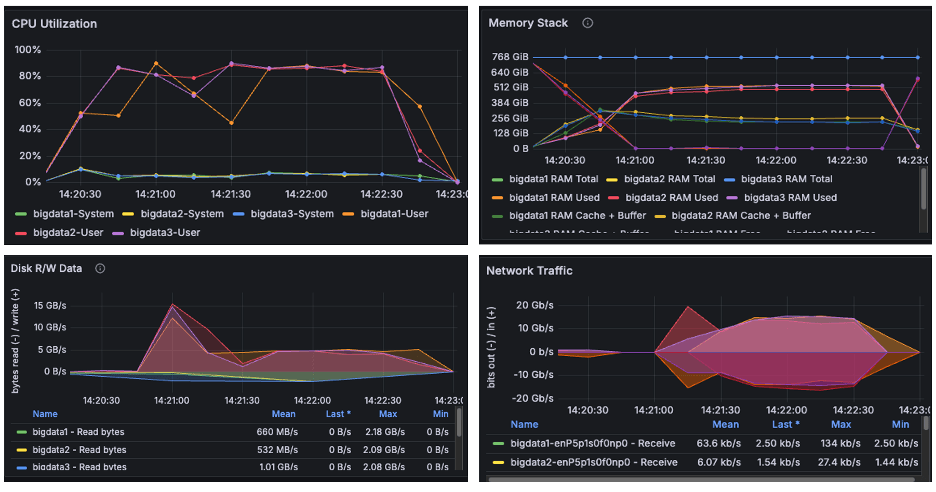
Figure 7
The above image is a snapshot from the Grafana dashboard captured while running the TeraSort benchmark. During the HiBench test, the systems achieved maximum CPU utilization up to 90% while running the TeraSort benchmark. We observed disk read/write activity of approximately 15 GB/s and network throughput of 20 GB/s. Since both observed I/O and network throughput were significantly below the cluster's scalable limits, the results confirm that the benchmark successfully pushed the CPU to its maximum capacity. We observed from the above graphs that AmpereOne® M not only drove disk and network I/O higher than Ampere Altra – 128C, but it also completed tasks considerably faster.
Power Consumption
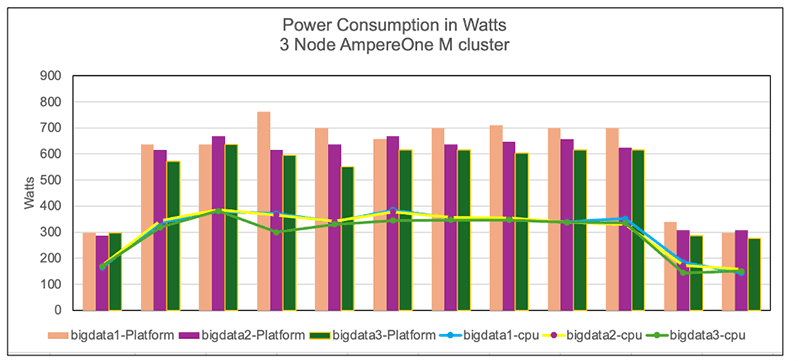
Figure 8
The graph illustrates the power consumption of cluster nodes, platform and CPU. The power was measured using the IPMI tool during the benchmark run. We observe that the AmpereOne M clusters consumed more power than the Ampere Altra – 128C cluster. This is not surprising in that the latest generation AmpereOne M systems have 50% more compute cores and support 50% more memory channels. Additionally, as shown earlier, this increased power usage also delivered notably higher TeraSort throughput as well as better power efficiency (perf/watt) on AmpereOne M processors (Figure 6).
TPC-DS Performance
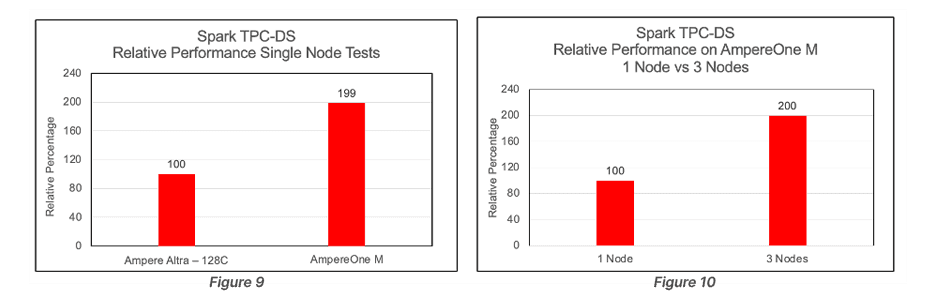
TPC-DS benchmarking tool was used to execute the TPC-DS workload on the clusters. The performance evaluation was based on the total time required to execute all 99 SQL queries on the cluster. Queries on AmpereOne M systems completed in 50% less time than those run on Ampere Altra – 128C systems. The TPC-DS scalability improvement observed between 1 and 3 nodes was less compared to the scalability seen with TeraSort.
64k Page Size
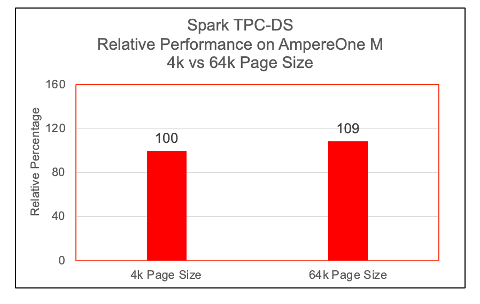
Figure 11
TPC-DS queries got a 9% boost by moving to 64k page size kernel.
Conclusion
This paper presents a reference architecture for deploying Spark on a multi-node cluster powered by AmpereOne M processors, and it compares the results to an earlier deployment based on Ampere Altra – 128C processors.
The latest TeraSort benchmark results reinforce the conclusions of earlier studies, demonstrating that Arm64-based data center processors provide a compelling, high-performance alternative to traditional x86 systems for Big Data workloads.
Extending this analysis, the evaluation of the 12‑channel DDR5 AmpereOne M platform shows measurable improvements in both raw throughput and performance-per-watt compared to previous generation processors. These gains confirm that the AmpereOne M processor is a groundbreaking platform designed for data centers and enterprises that prioritize performance, efficiency, and sustainability.
Big Data workloads demand substantial computational resources and persistent storage and by deploying these applications on Ampere processors, organizations benefit from both scale-up and scale-out architectures, enabling efficient growth while maintaining consistent throughput.
For more information, visit our website at https://www.amperecomputing.com. If you’re interested in additional workload performance briefs, tuning guides and more, please visit our Solutions Center at https://amperecomputing.com/solutions
Appendix
/etc/sysctl.conf
kernel.pid_max = 4194303 fs.aio-max-nr = 1048576 net.ipv4.conf.default.rp_filter=1 net.ipv4.tcp_timestamps=0 net.ipv4.tcp_sack = 1 net.core.netdev_max_backlog = 25000 net.core.rmem_max = 2147483647 net.core.wmem_max = 2147483647 net.core.rmem_default = 33554431 net.core.wmem_default = 33554432 net.core.optmem_max = 40960 net.ipv4.tcp_rmem =8192 33554432 2147483647 net.ipv4.tcp_wmem =8192 33554432 2147483647 net.ipv4.tcp_low_latency=1 net.ipv4.tcp_adv_win_scale=1 net.ipv6.conf.all.disable_ipv6 = 1 net.ipv6.conf.default.disable_ipv6 = 1 net.ipv4.conf.all.arp_filter=1 net.ipv4.tcp_retries2=5 net.ipv6.conf.lo.disable_ipv6 = 1 net.core.somaxconn = 65535 #memory cache settings vm.swappiness=1 vm.overcommit_memory=0 vm.dirty_background_ratio=2
/etc/security/limits.conf
* soft nofile 65536 * hard nofile 65536 * soft nproc 65536 * hard nproc 65536
Miscellaneous Kernel changes
#Disable Transparent Huge Page defrag echo never> /sys/kernel/mm/transparent_hugepage/defrag echo never > /sys/kernel/mm/transparent_hugepage/enabled #MTU 9000 for 100Gb Private interface and CPU governor on performance mode ifconfig enP6p1s0np0 mtu 9000 up cpupower frequency-set --governor performance
.bashrc file
export JAVA_HOME=/home/hadoop/jdk export JRE_HOME=$JAVA_HOME/jre export CLASSPATH=.:$JAVA_HOME/lib:$JRE_HOME/lib:$classpath export PATH=$PATH:$JAVA_HOME/bin:$JRE_HOME/bin #HADOOP_HOME export HADOOP_HOME=/home/hadoop/hadoop export SPARK_HOME=/home/hadoop/spark export HADOOP_INSTALL=$HADOOP_HOME export HADOOP_HDFS_HOME=$HADOOP_HOME export YARN_HOME=$HADOOP_HOME export PATH=$HADOOP_HOME/bin:$HADOOP_HOME/sbin:$PATH
core-site.xml
<configuration> <property> <name>fs.defaultFS</name> <value>hdfs://<server1>:9000</value> </property> <property> <name>hadoop.tmp.dir</name> <value>/data/data1/hadoop, /data/data2/hadoop, /data/data3/hadoop, /data/data4/hadoop </value> </property> <property> <name>io.native.lib.available</name> <value>true</value> </property> <property> <name>io.compression.codecs</name> <value>org.apache.hadoop.io.compress.GzipCodec, org.apache.hadoop.io.compress.DefaultCodec, org.apache.hadoop.io.compress.BZip2Codec, com.hadoop.compression.lzo.LzoCodec, com.hadoop.compression.lzo.LzopCodec, org.apache.hadoop.io.compress.SnappyCodec</value> </property> <property> <name>io.compression.codec.snappy.class</name> <value>org.apache.hadoop.io.compress.SnappyCodec</value> </property> </configuration>
hdfs-site.xml
configuration> <property> <name>dfs.replication</name> <value>1</value> </property> <property> <name>dfs.blocksize</name> <value>536870912</value> </property> <property> <name>dfs.namenode.name.dir</name> <value>file:/home/hadoop/hadoop_store/hdfs/namenode</value> </property> <property> <name>dfs.datanode.data.dir</name> <value>/data/data1/hadoop, /data/data2/hadoop, /data/data3/hadoop, /data/data4/hadoop </value> </property> <property> <name>dfs.client.read.shortcircuit</name> <value>true</value> </property> <property> <name>dfs.domain.socket.path</name> <value>/var/lib/hadoop-hdfs/dn_socket</value> </property> </configuration>
yarn-site.xml
<configuration> <!-- Site specific YARN configuration properties --> <property> <name>yarn.nodemanager.aux-services</name> <value>mapreduce_shuffle</value> </property> <property> <name>yarn.resourcemanager.hostname</name> <value><server1></value> </property> <property> <name>yarn.scheduler.minimum-allocation-mb</name> <value>1024</value> </property> <property> <name>yarn.scheduler.maximum-allocation-mb</name> <value>81920</value> </property> <property> <name>yarn.scheduler.minimum-allocation-vcores</name> <value>1</value> </property> <property> <name>yarn.scheduler.maximum-allocation-vcores</name> <value>186</value> </property> <property> <name>yarn.nodemanager.vmem-pmem-ratio</name> <value>4</value> </property> <property> <name>yarn.nodemanager.resource.memory-mb</name> <value>737280</value> </property> <property> <name>yarn.nodemanager.resource.cpu-vcores</name> <value>186</value> </property> <property> <name>yarn.log-aggregation-enable</name> <value>true</value> </property> </configuration>
mapred-site.xml
<configuration> <property> <name>mapreduce.framework.name</name> <value>yarn</value> </property> <property> <name>yarn.app.mapreduce.am.env</name> <value>HADOOP_MAPRED_HOME=$HADOOP_HOME</value> </property> <property> <name>mapreduce.map.env</name> <value>HADOOP_MAPRED_HOME=$HADOOP_HOME, LD_LIBRARY_PATH=$LD_LIBRARY_PATH </value> </property> <property> <name>mapreduce.reduce.env</name> <value>HADOOP_MAPRED_HOME=$HADOOP_HOME</value> </property> <property> <name>mapreduce.application.classpath</name> <value>$HADOOP_MAPRED_HOME/share/hadoop/mapreduce/*, $HADOOP_MAPRED_HOME/share/hadoop/mapreduce/lib-examples/*, $HADOOP_MAPRED_HOME/share/hadoop/mapreduce/sources/*, $HADOOP_MAPRED_HOME/share/hadoop/common/*, $HADOOP_MAPRED_HOME/share/hadoop/common/lib/*, $HADOOP_MAPRED_HOME/share/hadoop/yarn/*, $HADOOP_MAPRED_HOME/share/hadoop/yarn/lib/*, $HADOOP_MAPRED_HOME/share/hadoop/hdfs/*, $HADOOP_MAPRED_HOME/share/hadoop/hdfs/lib/*</value> </property> <property> <name>mapreduce.jobhistory.address</name> <value><server1>:10020</value> </property> <property> <name>mapreduce.jobhistory.webapp.address</name> <value><server1>:19888</value> </property> <property> <name>mapreduce.map.memory.mb</name> <value>2048</value> </property> <property> <name>mapreduce.map.cpu.vcore</name> <value>1</value> </property> <property> <name>mapreduce.reduce.memory.mb</name> <value>4096</value> </property> <property> <name>mapreduce.reduce.cpu.vcore</name> <value>1</value> </property> <property> <name>mapreduce.map.java.opts</name> <value> -Djava.net.preferIPv4Stack=true -Xmx2g -XX:+UseParallelGC -XX:ParallelGCThreads=32 -Xlog:gc*:stdout</value> </property> <property> <name>mapreduce.reduce.java.opts</name> <value> -Djava.net.preferIPv4Stack=true -Xmx3g -XX:+UseParallelGC -XX:ParallelGCThreads=32 -Xlog:gc*:stdout</value> </property> <property> <name>mapreduce.task.timeout</name> <value>6000000</value> </property> <property> <name>mapreduce.map.output.compress</name> <value>true</value> </property> <property> <name>mapreduce.map.output.compress.codec</name> <value>org.apache.hadoop.io.compress.SnappyCodec</value> </property> <property> <name>mapreduce.output.fileoutputformat.compress</name> <value>true</value> </property> <property> <name>mapreduce.output.fileoutputformat.compress.type</name> <value>BLOCK</value> </property> <property> <name>mapreduce.output.fileoutputformat.compress.codec</name> <value>org.apache.hadoop.io.compress.SnappyCodec</value> </property> <property> <name>mapreduce.reduce.shuffle.parallelcopies</name> <value>32</value> </property> <property> <name>mapred.reduce.parallel.copies</name> <value>32</value> </property> </configuration>
spark-defaults.conf
spark.driver.memory 32g # used driver memory as 64g for TPC-DS spark.dynamicAllocation.enabled=false spark.executor.cores 5 spark.executor.extraJavaOptions=-Djava.net.preferIPv4Stack=true -XX:+UseParallelGC -XX:ParallelGCThreads=32 spark.executor.instances 108 spark.executor.memory 18g spark.executorEnv.MKL_NUM_THREADS=1 spark.executorEnv.OPENBLAS_NUM_THREADS=1 spark.files.maxPartitionBytes 128m spark.history.fs.logDirectory hdfs://<Master Server>:9000/logs spark.history.fs.update.interval 10s spark.history.provider org.apache.spark.deploy.history.FsHistoryProvider spark.history.ui.port 18080 spark.io.compression.codec=org.apache.spark.io.SnappyCompressionCodec spark.io.compression.snappy.blockSize=512k spark.kryoserializer.buffer 1024m spark.master yarn spark.master.ui.port 8080 spark.network.crypto.enabled=false spark.shuffle.compress true spark.shuffle.spill.compress true spark.sql.shuffle.partitions 12000 spark.ui.port 8080 spark.worker.ui.port 8081 spark.yarn.archive hdfs://<Master Server>:9000/spark-libs.jar spark.yarn.jars=/home/hadoop/spark/jars/*,/home/hadoop/spark/yarn/*
hibench.conf
hibench.default.map/shuffle.parallelism 12000 # 3 node cluster hibench.scale.profile bigdata # the bigdata size configured as hibench.terasort.bigdata.datasize 30000000000 in ~/HiBench/conf/workloads/micro/terasort.conf
Related Content
Ampere Computing LLC
4655 Great America Parkway Suite 601
Santa Clara, CA 95054