
MinIO AIStor and Ampere® Computing Reference Architecture for High-Performance AI Inference
MinIO AIStor and Ampere® Computing Reference Architecture for High-Performance AI Inference
MinIO AIStor is a highly scalable, high-performance object storage solution tailored for AI workloads, especially in distributed or cloud-native environments. Designing a cluster for AI inference requires high-performance storage and efficient data retrieval. Thus, careful consideration must be given to storage architecture, compute resources, networking, and scalability. MinIO, Ampere®, Supermicro® and Micron Technology Inc have partnered to deliver and validate performance through comprehensive testing on an Ampere® Altra® 128 core-powered storage cluster consisting of eight nodes to allow for:
- Scalability: Horizontal scaling of storage and I/O performance.
- Redundancy: Built-in erasure coding ensures data durability even if nodes or drives fail.
- High Throughput: Parallel access and distributed storage enable fast read/write operations, suitable for AI or big data analytics.
- Kubernetes and Bare-metal Friendly: Can be deployed both on Kubernetes or as standalone Bare-metal nodes.
Ampere® Altra® family of processors provide predictable and consistent high performance under maximum load conditions. This is achieved through single-threaded compute cores, consistent operating frequency, and high core counts per socket. As a result, customers benefit from exceptional performance per rack, per watt, and per dollar.
This reference architecture focuses on AI inference leveraging Ampere CPUs. Below are some key use cases where an AIStor cluster accelerates inference pipelines:
- Efficient Large-Scale Data Access: AI inference requires access to large amounts of data, including pre-trained models, and datasets in a scalable, high-performance object store. Images, videos, logs, or sensor data are common data types – sometimes they are structured, and sometimes unstructured. For example, a modern medical application may store MRI scans and X-ray images in AIStor for on-demand inference.
- Real-Time Inference Applications: These image dense applications require fast and scalable data access. AIStor provides high-throughput and low-latency performance inference services to fetch and process data quickly. For example, anomaly detection in financial transactions where real-time logs are streamed into AIStor and processed by an inference engine.
- Edge AI: Edge device logs and model updates can be sent to a central AIStor cluster for federated learning. For example, a smart city AI system aggregating video feeds and inference results from edge cameras.
- Model Storage: A cloud-based inference platform using AIStor as a backend for high-throughput model versioning and retrieval. This is common for the quickly evolving ecosystem of large language models (LLMs) or vision language models (VLMs) used to power modern agentic AI workflows.
These examples illustrate just a few of the many ways industry leaders are adopting MinIO AIStor by serving as a scalable, high-speed, and secure object store backend. AIStor empowers organizations to efficiently deploy secure, high-speed AI inference at any scale, whether for model deployment, real-time analytics, or federated learning. Pairing this capability with Ampere’s highly efficient processors maximizes both scalability and energy efficiency.
Features
- Processor Subsystem
- 128 Armv8.2+ 64-bit CPU cores up to 3.0 GHz maximum
- 64 KB L1 I-cache, 64 KB L1 D-cache per core
- 1MB L2 cache per core
- 16 MB System Level Cache (SLC)
- 2x full-width (128b) SIMD
- Coherent mesh-based interconnect
- Distributed snoop filtering
- Memory
- 8x 72-bit DDR4-3200 channels
- ECC, Symbol-based ECC, and DDR4 RAS features
- Up to 16 DIMMs and 4 TB/socket
- System Resources
- Full interrupt virtualization (GICv3)
- Full I/O virtualization (SMMUv3)
- Enterprise server-class RAS
- Connectivity
- 128 lanes of PCIe Gen4
- 4 x16 PCIe + 4 x16 PCIe/CCIX with Extended Speed Mode (ESM) support for data transfers at 20/25 GT/s
- 32 controllers to support up to 32 x4 links
- Specifications
- Operating Junction Temperature Range: 0°C to +90°C
- Power Supplies
- CPU: 0.75 V, DDR4: 1.2 V
- I/O: 3.3 V/1.8 V, SerDes PLL: 1.8 V
- Packaging: 4926-Pin FCLGA
- Technology & Functionality
- Armv8.2+, SBSA Level 4
- Advanced Power Management – Dynamic estimation, Voltage droop mitigation
- Process Technology
- TSMC 7 nm FinFET
The Supermicro MegaDC platform based on Ampere® Altra® family of processors features a single socket motherboard design and supports up to 4TB of DDR4 memory. 128 lanes of PCIe 4.0 with plenty of configurability in the base chassis which allows customers to design the platforms to meet their specific space, power, performance and I/O requirements.
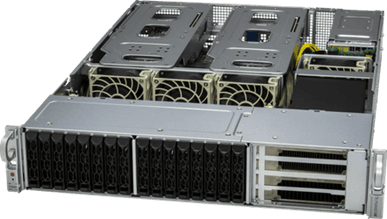
Features
- Processor
- Ampere® Altra® Processor 128 Cores
- Max Socket TDP: 250W
- Chassis & Power
- Form Factor: 2U ARS-210M-NR
- Power: Dual CRPS 80 PLUS Titanium Redundant PSUs, 2400/1600/1200/1000W with PMBus 1.2 support.
- Thermal Fan: 4x 80mm
- Memory, Expansion & Storage
- 16x DIMMs DDR4-3200 (8-channels, 2DPC) up to 4TB
- 16 (24)x SFF NVMe option (E1.S/E3.S option module)
- 1x PCIe Gen4 x4, NGFF (22110/2280)
- CX4 Lx-EN for 2x 10Gb or 1x 25Gb SFP28
- 8x Slim-SAS x8
- Riser1: 6x PCIe Gen4 x8 Slimline SAS connectors for NVMe or Riser
- OCP 3.0, up to PCIe Gen4 x16
- BMC
- BMC Support: AST2600
- BMC Network: CX4 Lx-EN for 2x 10Gb or 1x 25Gb SFP28
- Software
- Firmware Support: UEFI: AMI AptioV BMC: OpenBMC
The Micron 7500 Pro 15.36TB U.2/U.3 NVMe SSD is a high-performance, read-intensive solid-state drive designed for enterprise and data center environments.
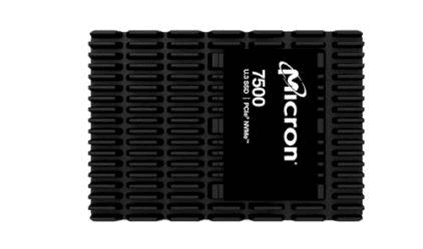
Features
- Hardware Specifications
- Capacity: 15.36 TB
- Form Factor: 2.5” U.3 (backward compatible with U.2), 15mm height
- Interface: PCIe Gen4 x4, NVMe v2.0b
- NAND Type: Micron 3D TLC NAND
- Endurance: 1 Drive Write Per Day (DWPD), totaling 28,032 TBW (Terabytes Written)
- MTTF (Mean Time to Failure): 2 million hours at 55°C; 2.5 million hours at 50°C
- Unrecoverable Bit Error Rate (UBER): <1 sector per 10¹⁸ bits read.
- Performance Metrics
- Sequential Read Speed: Up to 7,000 MB/s
- Sequential Write Speed: Up to 5,900 MB/s
- Random Read IOPS (4K): Up to 1,100,000
- Random Write IOPS (4K): Up to 250,000
- 70/30 Random Read/Write IOPS: Up to 530,000
- Typical Latency: 70 µs (read), 15 µs (write)
- Environmental & Physical
- Operating Temperature: 0°C to 70°C
- Dimensions: 69.85mm x 100mm x 15mm
- Power Consumption:
- Sequential Read (average): 15.5W
- Sequential Write (average): 18.3W
MinIO AIStor Software Defined Storage Architecture
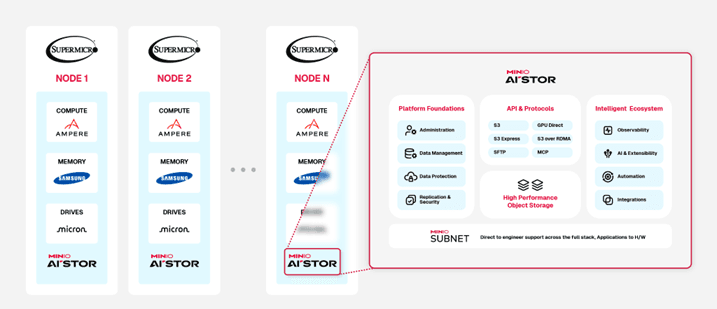 Figure 1AIStor reference architecture for 8-node cluster with eight NVMe drives
- CPU Type: Ampere® Altra® 128 cores, 3.0 GHz
- Memory: 512GB DDR4 3200MT/s Samsung Memory
- Storage: 8x Micron 7500 Pro 15.36TB
- Network: 1x 200Gbps ConnectX-6 NIC
- AIStor SDS
- minio version: RELEASE.2025-04-07T20-05-12Z (commit-id=4ed20f54545454b7f4627de2435dae8973248714)
- Runtime: go1.24.1 linux/arm64
- License: MinIO AIStor Enterprise License Copyright: 2015-2025 MinIO, Inc.
- OS: Ubuntu 22.04.5 LTSKernel: 6.8.0-58-generic
Deploy AIStor Object Storage on 8-Node Bare Metal Cluster with Supermicro Platforms
Setup Environment to Deploy AIStor on 8-Node Bare Metal Cluster
System Setting and Checking
Each node of the cluster, add grub setting ‘iommu.passthrough=1’ in /etc/default/grub and update its grub.
GRUB_CMDLINE_LINUX_DEFAULT="iommu.passthrough=1" $ sudo update-grub2 $ sudo update-grub2
Each node of the cluster, set the CPU scaling governor to ‘performance’ and verify to make sure that the nodes are running at ‘performance’ mode.
$ echo performance | sudo tee /sys/devices/system/cpu/*/cpufreq/scaling_governor $ sudo cat /sys/devices/system/cpu/cpu*/cpufreq/scaling_governor | uniq -c
Each node of the cluster, check link status for all drives to make sure the PCIe speed and width detected correctly. In this example, assume that we use Micron drives.
$ sudo lspci -vvv | grep -i Micron -A 50 | grep -i LnkSta | grep -i Speed <br> LnkSta: Speed 16GT/s (ok), Width x4 (ok) <br> LnkSta: Speed 16GT/s (ok), Width x4 (ok) <br> LnkSta: Speed 16GT/s (ok), Width x4 (ok) <br> LnkSta: Speed 16GT/s (ok), Width x4 (ok) <br> LnkSta: Speed 16GT/s (ok), Width x4 (ok) <br> LnkSta: Speed 16GT/s (ok), Width x4 (ok) <br> LnkSta: Speed 16GT/s (ok), Width x4 (ok) <br> LnkSta: Speed 16GT/s (ok), Width x4 (ok) <br>
Check to see if the Max Read Request set to 512 bytes for the drives
$ sudo lspci -vvv | grep -i Micron -A 50 | grep -i MaxReadReq MaxPayload 512 bytes, MaxReadReq 512 bytes MaxPayload 256 bytes, MaxReadReq 512 bytes MaxPayload 512 bytes, MaxReadReq 512 bytes MaxPayload 256 bytes, MaxReadReq 512 bytes MaxPayload 512 bytes, MaxReadReq 512 bytes MaxPayload 256 bytes, MaxReadReq 512 bytes MaxPayload 512 bytes, MaxReadReq 512 bytes MaxPayload 256 bytes, MaxReadReq 512 bytes
Prior to use the drives and run benchmark, you need to format all the drives on each of the 8x nodes.
$ sudo apt install nvme-cli
Create an executable shell script format_drives.sh. Depend on which NVMe using for boot drive, exclude it from the format_drives.sh Note in the example, exclude nvme4 because it is the boot drive.
$ cat format_drives.sh nvme format -s1 /dev/nvme0n1 & nvme format -s1 /dev/nvme1n1 & nvme format -s1 /dev/nvme2n1 & nvme format -s1 /dev/nvme3n1 & nvme format -s1 /dev/nvme5n1 & nvme format -s1 /dev/nvme6n1 & nvme format -s1 /dev/nvme7n1 & nvme format -s1 /dev/nvme8n1
Networking and Firewalls
Each node should have full bidirectional network access to every other node in the deployment. The following command explicitly opens the default AIStor server API port 9000 and 9001 for each node running firewall
$ sudo firewall-cmd --permanent --zone=public --add-port=9000/tcp $ sudo firewall-cmd --permanent --zone=public --add-port=9001/tcp $ sudo firewall-cmd --reload
Sequential Hostnames
AIStor requires using expansion notation {x...y} to denote a sequential series of AIStor hosts when creating a server pool. AIStor therefore requires using sequentially numbered hostnames to represent each AIStor server process in the deployment.
| Node1 | Node2 | Node3 | Node4 | Node5 | Node6 | Node7 | Node8 | |
|---|---|---|---|---|---|---|---|---|
| Hostname | storage-node1 | storage-node2 | storage-node3 | storage-node4 | storage-node5 | storage-node6 | storage-node7 | storage-node8 |
| 1st 1Gbps network | 172.16.147.x | 172.16.147.x | 172.16.147.x | 172.16.147.x | 172.16.147.x | 172.16.147.x | 172.16.147.x | 172.16.147.x |
| 2nd 200Gbps network | 192.168.4.201-208 | 192.168.4.202 | 192.168.4.203 | 192.168.4.204 | 192.168.4.205 | 192.168.4.206 | 192.168.4.207 | 192.168.4.208 |
Note: to change the hostname, use the command ‘hostnamectl set-hostname <new hostname>’
Local JBOD Storage with Sequential Mounts
MinIO strongly recommends direct-attached JBOD arrays with XFS-formatted disks for best performance. Ensure all nodes in the deployment use the same type (NVMe, SSD, or HDD) drive with identical capacity.
AIStor does not distinguish drive types and does not benefit from mixed storage types. Additionally, AIStor limits the size used per drive to the smallest drive in the deployment.
| Labels | Node 1-8 |
|---|---|
| minio-data1 | nvme0n1 |
| minio-data2 | nvme1n1 |
| minio-data3 | nvme2n1 |
| minio-data4 | nvme3n1 |
| minio-data5 | nvme5n1 |
| minio-data6 | nvme6n1 |
| minio-data7 | nvme7n1 |
| minio-data8 | nvme8n1 |
AIStor requires using expansion notation {x...y} to denote a sequential series of drives when creating the new deployment, where all nodes in the deployment have an identical set of mounted drives. AIStor also requires that the ordering of physical drives remain constant across restarts, such that a given mount point always points to the same formatted drive. MinIO therefore strongly recommends using /etc/fstab or a similar file-based mount configuration to ensure that drive ordering cannot change after a reboot.
For example, on each AIStor node, xfs-formatted drives as below, assume that there are 8 drives per node:
ampere@storage-node1:~# sudo mkfs.xfs /dev/nvme0n1 -L minio-data1 meta-data=/dev/nvme0n1 isize=512 agcount=4, agsize=117210902 blks = sectsz=512 attr=2, projid32bit=1 = crc=1 finobt=1, sparse=1, rmapbt=0 = reflink=1 bigtime=0 inobtcount=0 data = bsize=4096 blocks=468843606, imaxpct=5 = sunit=0 swidth=0 blks naming =version 2 bsize=4096 ascii-ci=0, ftype=1 log =internal log bsize=4096 blocks=228927, version=2 = sectsz=512 sunit=0 blks, lazy-count=1 realtime =none extsz=4096 blocks=0, rtextents=0 Discarding blocks...Done. ....... ampere@storage-node1:~# sudo mkfs.xfs /dev/nvme8n1 -L minio-data8 meta-data=/dev/nvme8n1 isize=512 agcount=4, agsize=117210902 blks = sectsz=512 attr=2, projid32bit=1 = crc=1 finobt=1, sparse=1, rmapbt=0 = reflink=1 bigtime=0 inobtcount=0 data = bsize=4096 blocks=468843606, imaxpct=5 = sunit=0 swidth=0 blks naming =version 2 bsize=4096 ascii-ci=0, ftype=1 log =internal log bsize=4096 blocks=228927, version=2 = sectsz=512 sunit=0 blks, lazy-count=1 realtime =none extsz=4096 blocks=0, rtextents=0 Discarding blocks...Done.
Using /etc/fstab to ensure that drive ordering cannot change after a reboot. Edit /etc/fstab in each AIStor node:
$ sudo vi /etc/fstab # <file system> <mount point> <type> <options> <dump> <pass> LABEL=minio-data1 /mnt/minio-data1 xfs defaults,noatime 0 0 LABEL=minio-data2 /mnt/minio-data2 xfs defaults,noatime 0 0 LABEL=minio-data3 /mnt/minio-data3 xfs defaults,noatime 0 0 LABEL=minio-data4 /mnt/minio-data4 xfs defaults,noatime 0 0 LABEL=minio-data5 /mnt/minio-data5 xfs defaults,noatime 0 0 LABEL=minio-data6 /mnt/minio-data6 xfs defaults,noatime 0 0 LABEL=minio-data7 /mnt/minio-data7 xfs defaults,noatime 0 0 LABEL=minio-data8 /mnt/minio-data8 xfs defaults,noatime 0 0
You can then specify the entire range of drives using the expansion notation /mnt/minio-data{1...8}. AIStor does not support arbitrary migration of a drive with existing data to a new mount position, whether intentional or as the result of OS-level behavior. Reboot all 8x minio nodes after editing /etc/fstab files. Check the /mnt folder:
ampere@storage-node1:~$ ls /mnt minio-data1 minio-data2 minio-data3 minio-data4 minio-data5 minio-data6 minio-data7 minio-data8 ......... ampere@storage-node8:~$ ls /mnt minio-data1 minio-data2 minio-data3 minio-data4 minio-data5 minio-data6 minio-data7 minio-data8
Time Synchronization
Multi-node systems must maintain synchronized time and date to maintain stable internode operations and interactions. Make sure all nodes sync to the same time server regularly using ntp synchronization service.
Check on each AIStor node:
ampere@storage-node1:~$ timedatectl list-timezones | grep America/Los_Angeles America/Los_Angeles ampere@storage-node1:~$ sudo timedatectl set-timezone America/Los_Angeles [sudo] password for ubuntu: ampere@storage-node1:~$ timedatectl Local time: Wed 2023-08-23 17:15:25 PDT Universal time: Thu 2023-08-24 00:15:25 UTC RTC time: Thu 2023-08-24 00:15:26 Time zone: America/Los_Angeles (PDT, -0700) System clock synchronized: yes NTP service: active RTC in local TZ: no ....... ampere@storage-node8:~$ sudo timedatectl set-timezone America/Los_Angeles [sudo] password for ubuntu: ampere@storage-node8:~$ timedatectl Local time: Wed 2023-08-23 17:17:07 PDT Universal time: Thu 2023-08-24 00:17:07 UTC RTC time: Thu 2023-08-24 00:17:07 Time zone: America/Los_Angeles (PDT, -0700) System clock synchronized: yes NTP service: active RTC in local TZ: no
Homogeneous Node Configurations
MinIO strongly recommends selecting substantially similar hardware configurations for all nodes in the deployment. Ensure the hardware (CPU, memory, motherboard, storage adapters) and software (operating system, kernel settings, system services) is consistent across all nodes.
Deploy AIStor on 8-Node Bare Metal Cluster
Install the AIStor Binary on Each Node
Use the following option to download the AIStor server installation file on each node running Ubuntu 22.04:
$ wget https://dl.min.io/aistor/minio/release/linux-arm64/archive/minio_20250407200512.0.0_arm64.deb -O minio.deb $ sudo dpkg -i minio.deb
For example, on each minio node:
ampere@storage-node1:~$ sudo dpkg -i minio.deb ..... ampere@storage-node8:~$ sudo dpkg -i minio.deb
Create the systemd Service File
The .deb packages install the following systemd service file to /etc/systemd/system/minio.service. For binary installations, create this file manually on all AIStor hosts:
[Unit] Description=MinIO Documentation=https://docs.min.io Wants=network-online.target After=network-online.target AssertFileIsExecutable=/usr/local/bin/minio [Service] Type=notify WorkingDirectory=/usr/local User=root Group=root ProtectProc=invisible EnvironmentFile=-/etc/minio/minio.config ExecStartPre=/bin/bash -c "if [ -z \"${MINIO_VOLUMES}\" ]; then echo \"Variable MINIO_VOLUMES not set in /etc/default/minio\"; exit 1; fi" ExecStart=/usr/local/bin/minio server $MINIO_OPTS $MINIO_VOLUMES # Let systemd restart this service always Restart=always # Specifies the maximum file descriptor number that can be opened by this process LimitNOFILE=1048576 # Specifies the maximum number of threads this process can create TasksMax=infinity # Disable timeout logic and wait until process is stopped TimeoutStopSec=infinity SendSIGKILL=no [Install] WantedBy=multi-user.target # Built for ${project.name}-${project.version} (${project.name})
The minio.service file runs as the minio-user User and Group by default. You can create the user and group using the groupadd and useradd commands. The following example creates the user, group, and sets permissions to access the folder paths intended for use by AIStor. These commands typically require root (sudo) permissions.
$ sudo groupadd -r root $ sudo useradd -M -r -g root root $ sudo chown root:root /mnt/minio-data1 /mnt/minio-data2 /mnt/minio-data3 /mnt/minio-data4 /mnt/minio-data5 /mnt/minio-data6 /mnt/minio-data7 /mnt/minio-data8
Checking /mnt folder on ALL 8x AIStor nodes:
ampere@storage-node1:~$ ls -l /mnt/ total 0 drwxr-xr-x 5 root root 64 Apr 15 18:32 minio-data1 drwxr-xr-x 5 root root 64 Apr 15 18:32 minio-data2 drwxr-xr-x 5 root root 64 Apr 15 18:32 minio-data3 drwxr-xr-x 5 root root 64 Apr 15 18:32 minio-data4 drwxr-xr-x 5 root root 64 Apr 15 18:32 minio-data5 drwxr-xr-x 5 root root 64 Apr 15 18:32 minio-data6 drwxr-xr-x 5 root root 64 Apr 15 18:32 minio-data7 drwxr-xr-x 5 root root 64 Apr 15 18:32 minio-data8 ..... ampere@storage-node8:~$ ls -l /mnt/ total 0 drwxr-xr-x 5 root root 64 Apr 15 18:32 minio-data1 drwxr-xr-x 5 root root 64 Apr 15 18:32 minio-data2 drwxr-xr-x 5 root root 64 Apr 15 18:32 minio-data3 drwxr-xr-x 5 root root 64 Apr 15 18:32 minio-data4 drwxr-xr-x 5 root root 64 Apr 15 18:32 minio-data5 drwxr-xr-x 5 root root 64 Apr 15 18:32 minio-data6 drwxr-xr-x 5 root root 64 Apr 15 18:32 minio-data7 drwxr-xr-x 5 root root 64 Apr 15 18:32 minio-data8
Create the Service Environment File
Create an environment file at /etc/default/minio. The AIStor service uses this file as the source of all environment variables used by AIStor and the minio.service file. The following example assumes that the deployment has a single server pool consisting of:
- Eight AIStor server hosts with sequential hostnames: storage-node1, storage-node2, storage-node3, storage-node4, storage-node5, storage-node6, storage-node7, storage-node8
- All hosts have eight locally-attached drives with sequential mount-points:
ampere@storage-node1:~$ ls -l /mnt/ total 0 drwxr-xr-x 5 root root 64 Apr 15 18:32 minio-data1 drwxr-xr-x 5 root root 64 Apr 15 18:32 minio-data2 drwxr-xr-x 5 root root 64 Apr 15 18:32 minio-data3 drwxr-xr-x 5 root root 64 Apr 15 18:32 minio-data4 drwxr-xr-x 5 root root 64 Apr 15 18:32 minio-data5 drwxr-xr-x 5 root root 64 Apr 15 18:32 minio-data6 drwxr-xr-x 5 root root 64 Apr 15 18:32 minio-data7 drwxr-xr-x 5 root root 64 Apr 15 18:32 minio-data8
Modify the example to reflect your deployment topology. In the below example, the environment file at /etc/default/minio is created for 8-node cluster with 8-drives.
# Set the hosts and volumes AIStor uses at startup # The command uses AIStor expansion notation {x...y} to denote a # sequential series. # # The following example covers four AIStor hosts # with 8 drives each at the specified hostname and drive locations. # The command includes the port that each AIStor server listens on # (default 9000) MINIO_VOLUMES="http://storage-node{1...8}:9000/mnt/minio-data{1...8}" # Set all AIStor server options # # The following explicitly sets the AIStor Console listen address to # port 9001 on all network interfaces. The default behavior is dynamic # port selection. MINIO_OPTS="--console-address :9001" # Set the root username. This user has unrestricted permissions to # perform S3 and administrative API operations on any resource in the # deployment. # # Defer to your organizations requirements for superadmin user name. MINIO_ROOT_USER=<minio-user> # Set the root password # # Use a long, random, unique string that meets your organizations # requirements for passwords. MINIO_ROOT_PASSWORD=<minio-password> # Set to the URL of the load balancer for the AIStor deployment # This value *must* match across all AIStor servers. If you do # not have a load balancer, set this value to any *one* of the # AIStor hosts in the deployment as a temporary measure. MINIO_SERVER_URL="http://192.168.4.201:9000"
NOTE: Put your own MINIO_ROOT_USER and MINIO_ROOT_PASSWORD
MINIO_VOLUME settings for different AIStor topology as an example
| 8-Node with Eight Drives | 8-Node with Four Drives | |
|---|---|---|
| MINIO_VOLUMES | http://storage-node{1...8}:9000/mnt/minio-data{1...8} | http://storage-node{1...8}:9000/mnt/minio-data{1...4} |
Run the AIStor Server Process
Issue the following commands on each node in the deployment to start the AIStor service:
$ sudo systemctl start minio.service
Use the following commands to confirm the service is online and functional on each node:
$ sudo systemctl status minio.service $ sudo systemctl enable minio Created symlink /etc/systemd/system/multi-user.target.wants/minio.service → /etc/systemd/system/minio.service. ampere@storage-node1:~$ sudo journalctl -f -u minio.service Aug 24 11:17:00 minio1 minio[82802]: Automatically configured API requests per node based on available memory on the system: 2711 Aug 24 11:17:00 minio1 minio[82802]: All MinIO sub-systems initialized successfully in 4.408856885s Aug 24 11:17:00 minio1 minio[82802]: MinIO Object Storage Server Aug 24 11:17:00 minio1 minio[82802]: Copyright: 2015-2025 MinIO, Inc. ...... ampere@storage-node8:~$ sudo journalctl -f -u minio.service Aug 24 11:16:56 minio2 minio[78231]: All MinIO sub-systems initialized successfully in 26.722115ms Aug 24 11:16:56 minio2 minio[78231]: MinIO Object Storage Server Aug 24 11:16:56 minio2 minio[78231]: Copyright: 2015-2025 MinIO, Inc.
Note: If any drives remain offline after starting AIStor, check and cure any issues blocking their functionality before starting production workloads.
Shut down the AIStor Hosts
$ sudo systemctl stop minio.service
Note: if you need to create another AIStor topology using different number of servers and drives, you need to delete the AIStor resources prior to start and enable AIStor setup again.
$ sudo rm -rf /mnt/disk*/minio/.minio.sys $ ls -la /mnt/disk*/minio
MinIO AIStor Benchmarking
MinIO helps you measure the throughput of your servers under various conditions by simulating read and write workloads on specified numbers of objects with different sizes. Warp is a performance benchmarking tool specifically designed for distributed S3 service including evaluating their scalability and latency under heavy workload. It is particularly useful when testing large-scale object storage deployments. Warp tests consist of several components:
- Coordinator node which is responsible for managing the overall benchmarking processes and distributing workloads among worker nodes and collecting performance data from them.
- Worker node(s) which execute various read/write requests against AIStor servers in parallel based on instructions received from the master node.
- Clients which generate I/O traffic by sending random read/write requests using a custom client library provided with Warp test. These clients interact only with worker nodes, not directly with servers, to help isolate any impact of network latency on performance measurements.
In this reference architecture, we run a series of GET, LIST, PUT, DELETE and STAT operations tested by MinIO Warp. These tests are crucial for AI inference applications because these operations directly impact the speed, reliability, and scalability of the data pipeline.
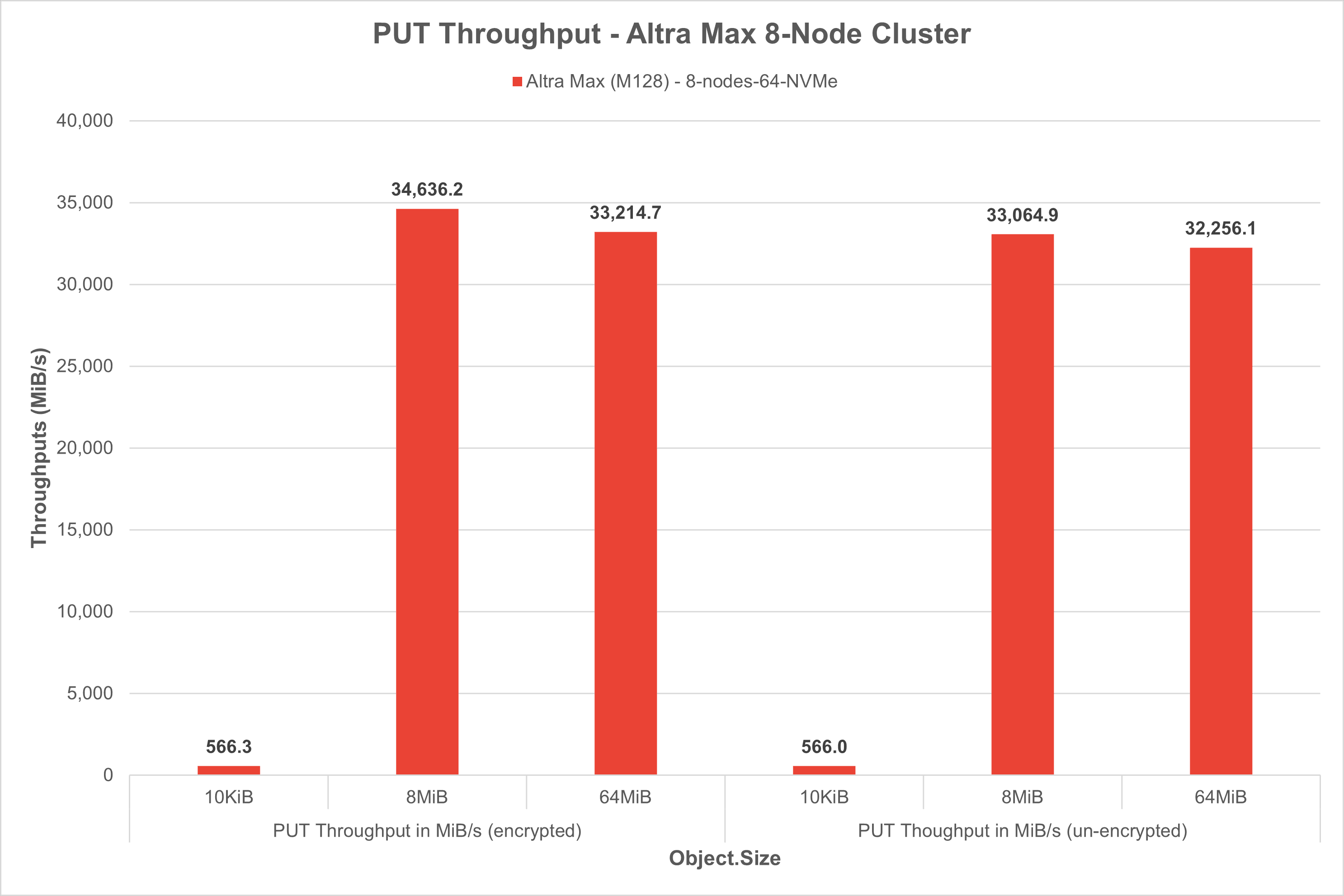
PUT tests: AI inference pipelines often require uploading large batches of videos, images, audios, or sensor data before they can be processed. High PUT performance ensures fast ingestion from data preprocessing pipelines into object storage.
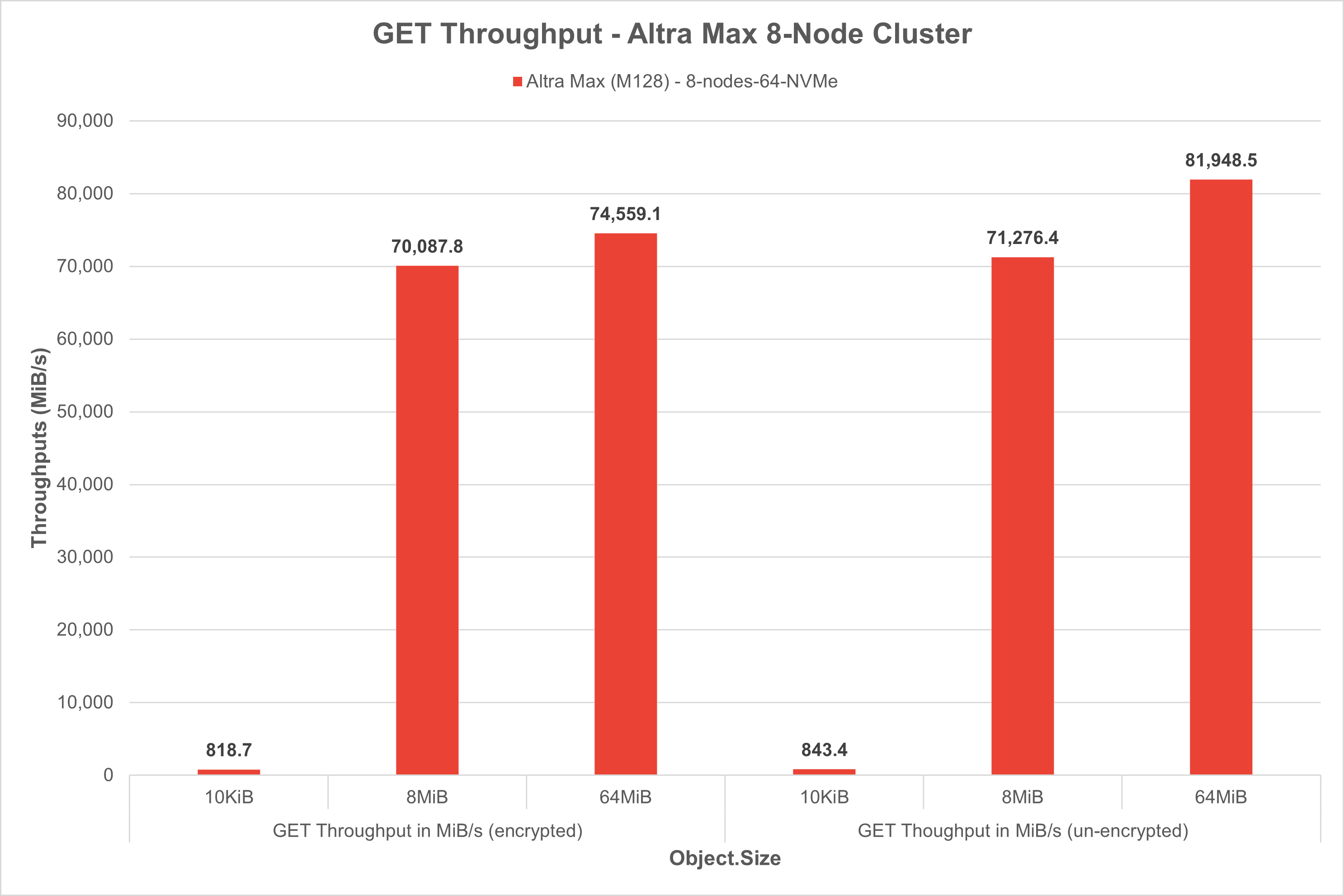
GET tests: AI models (e.g.YOLO, Whisper) need to pull data for real time or batch inference. Fast and scalable GET performance means quick access to input data, reducing inference latency and maximizing CPU utilization.
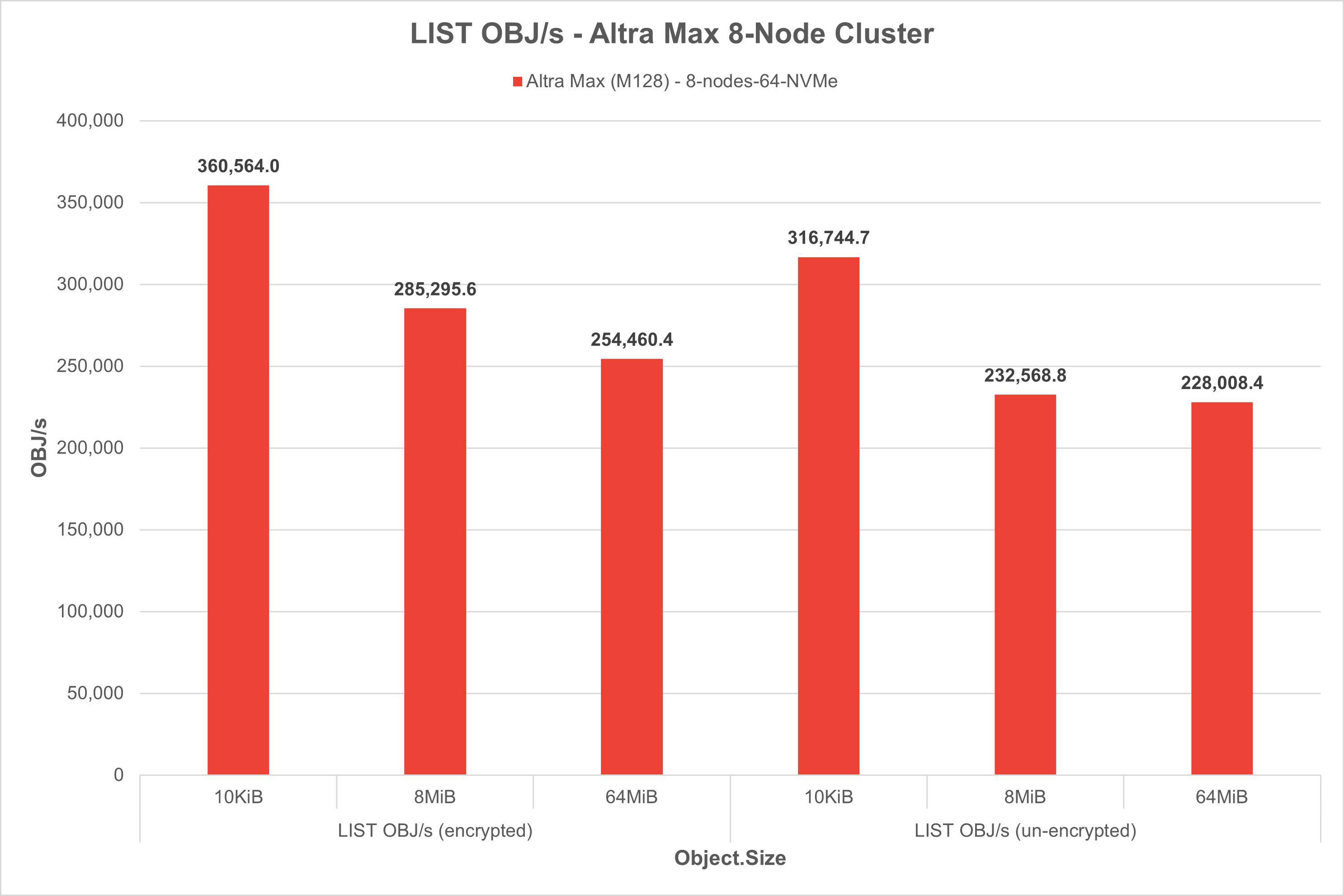
LIST tests: Listing objects are used to dynamically determine which data are available for inference or post-processing. Efficient LIST operations enable real-time workload scheduling and queueing for AI tests.
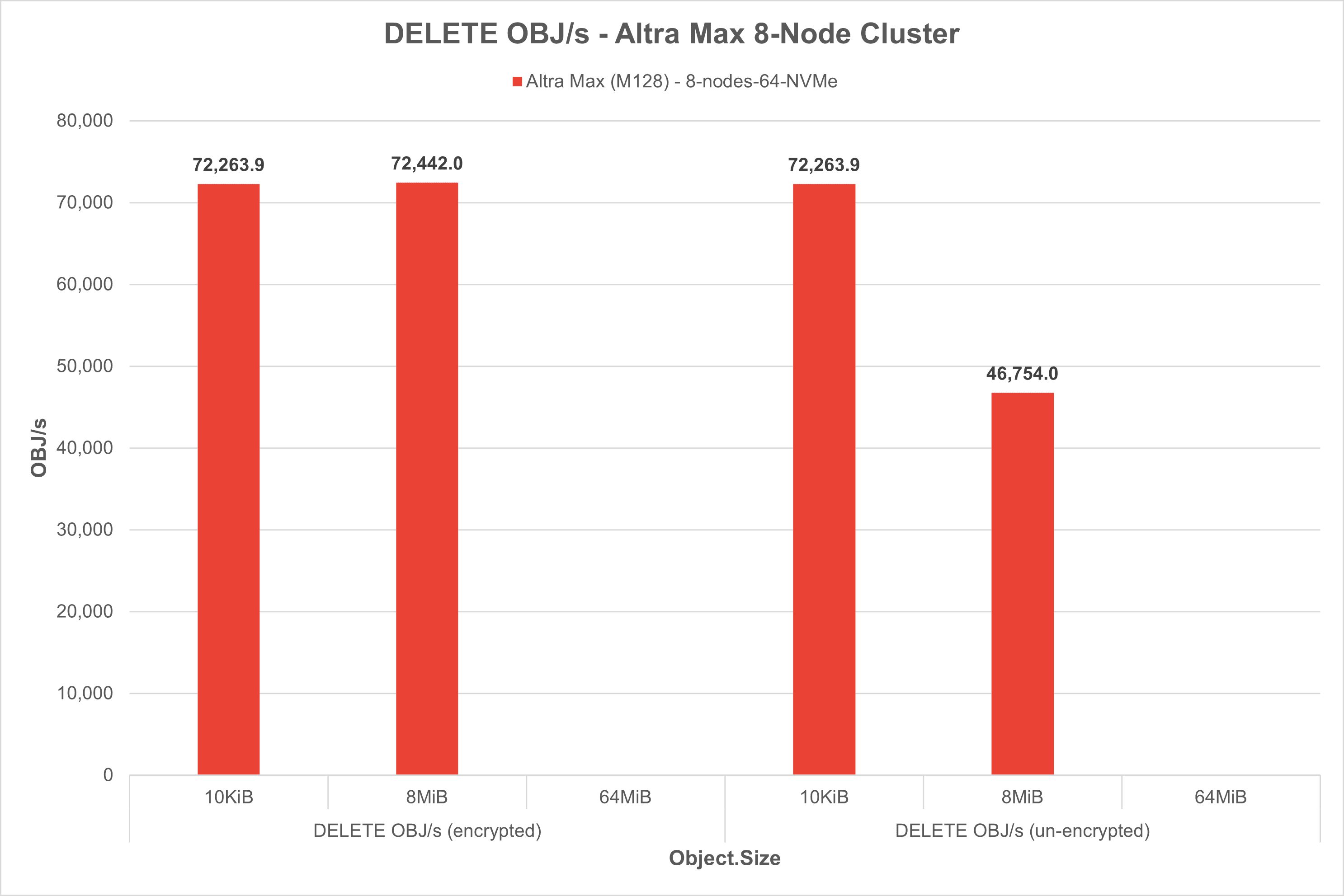
DELETE tests: to avoid storage bloat, AI pipelines frequently delete low-priority data. Fast DELETE operations reduce storage cost and keep the pipeline clean, and efficient, especially in long-running inference workflows.
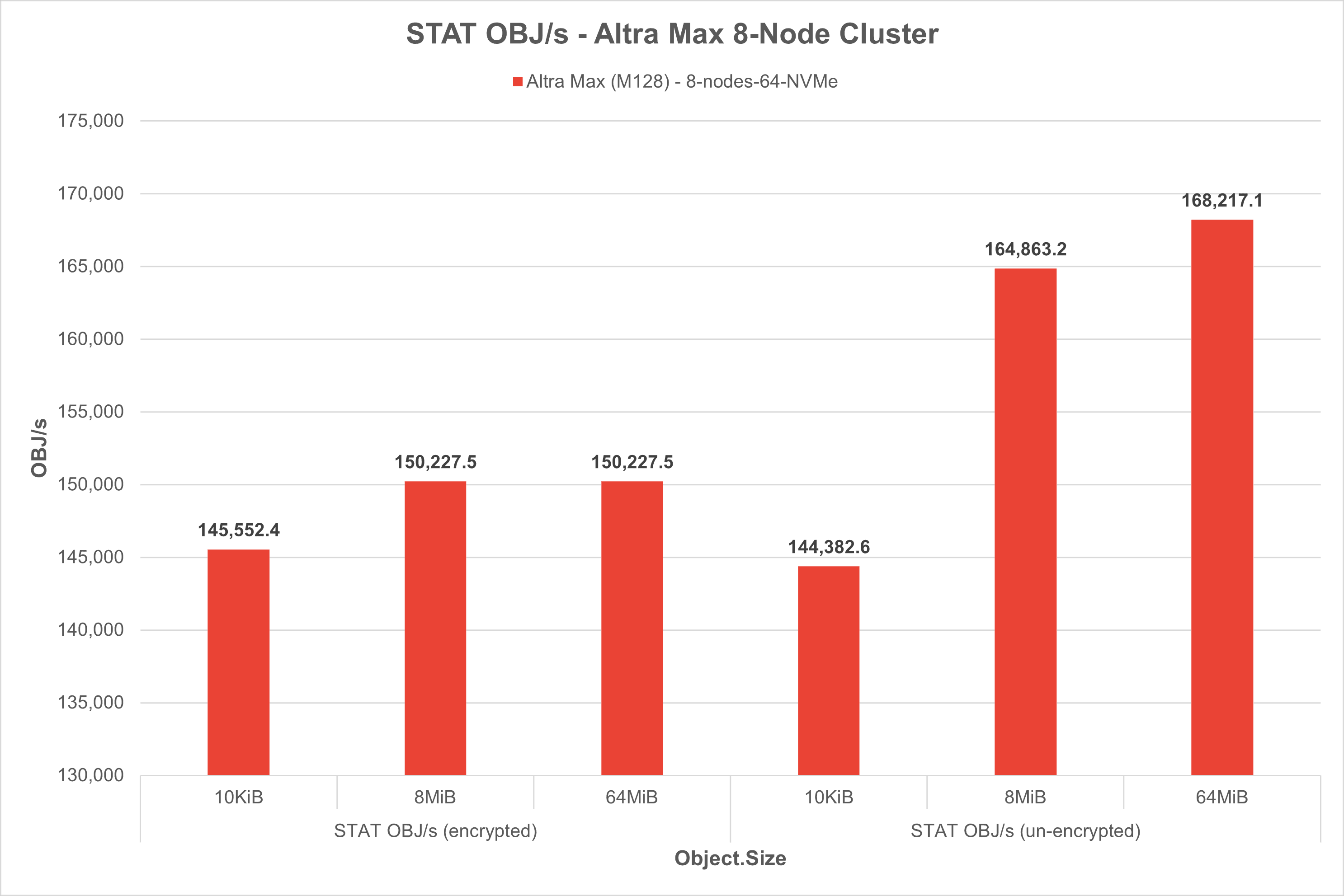
STAT tests: STAT is used to check existence, size, or last modified time of files (Metadata lookup) - useful in version control, model checkpoints, etc. High performance STAT operations help orchestrators make fast decisions about data readiness.
Client Warp Benchmark
Warp test is highly configurable and can customize the number of clients, concurrency levels, object sizes, test durations, and more to accurately assess AIStor’s performance under different conditions.
Download warp test on each of the 8x AIStor clients
$ wget ‘https://github.com/minio/warp/releases/download/v1.3.0/warp_Linux_arm64.deb’
Install warp deb package on each of the 8x AIStor clients
$ sudo dpkg -i warp_Linux_arm64.deb
Run warp client on each of the 8x AIStor clients
$ warp client warp: Listening on :7761
Run warp benchmark example.
$ warp get --duration=1m --warp-client=minio-client{1...8} --host=storage-node{1...8}:9000 --access-key=<access-key> --secret-key=<secret-key> --bucket=smc-8nodes-cluster-warptest --obj.size=64M
Network Bandwidth Consideration
When testing AIStor performance using Warp, it is important to consider the impact of network bandwidth on results because object storage systems often involve transferring large amounts of data over a network.
Here are some of the factors, considerations and best practices related to networking when conducting AIStor benchmarking:
- Consider using dedicated test networks with sufficient capacity for minimizing the impact of contention on performance measurements when testing on large scale, distributing environment, or large number of drives per nodes, or HDD vs. SSD drives.
- Consider using tools like iPerf to measure and analyze your test network’s bandwidth capabilities independently of AIStor benchmarks for better understanding the impact on overall system performance
AIStor Performance/Benchmark DataEncrypted Testcases
GET Test
Run a 5-minute benchmark test simulating 100 concurrent GET requests per client across 8 clients (800 concurrent in total), randomly retrieving 125,000 objects of 10 KiB, 8MiB, and 64MiB each from the warp-bench bucket over encrypted TLS.
| Configuration | Test Commands |
|---|---|
| Object Size=10KiB, Concurrency=800, Time=5m | warp get --insecure=true --access-key=*REDACTED* --secret-key=*REDACTED* --tls=true --region=us-east-1 --bucket=warp-bench --concurrent=100 --prefix=objsize-10KiB-threads-100/ --objects=125000 --obj.size=10KiB --list-existing=true --obj.generator=random --benchdata=objsize-10KiB-threads-100-get-25-07-07-11-55 --duration=5m0s --noclear=true --warp-client=192.168.4.20{1...8} |
| Object Size=8MiB, Concurrency=800, Time=5m | warp get --insecure=true --access-key=*REDACTED* --secret-key=*REDACTED* --tls=true --region=us-east-1 --bucket=warp-bench --concurrent=100 --prefix=objsize-8MiB-threads-100/ --objects=125000 --obj.size=8MiB --list-existing=true --obj.generator=random --benchdata=objsize-8MiB-threads-100-get-25-07-08-12-00 --duration=5m0s --noclear=true --warp-client=192.168.4.20{1...8} |
| Object Size=64MiB, Concurrency=800, Time=5m | warp get --insecure=true --access-key=*REDACTED* --secret-key=*REDACTED* --tls=true --region=us-east-1 --bucket=warp-bench --concurrent=100 --prefix=objsize-64MiB-threads-100/ --objects=125000 --obj.size=64MiB --list-existing=true --obj.generator=random --benchdata=objsize-64MiB-threads-100-get-25-07-08-12-05 --duration=5m0s --noclear=true --warp-client=192.168.4.20{1...8} |
PUT Test
Run a 5-minute benchmark test simulating 100 concurrent PUT requests per client across 8 clients (800 concurrent in total), objects of 10 KiB, 8MiB, and 64MiB each from the warp-bench bucket over encrypted TLS.
| Configuration | Test Commands |
|---|---|
| Object Size=10KiB, Concurrency=800, Time=5m | warp put --insecure=true --access-key=*REDACTED* --secret-key=*REDACTED* --tls=true --region=us-east-1 --bucket=warp-bench --concurrent=100 --prefix=objsize-10KiB-threads-100/ --stress=true --obj.size=10KiB --obj.generator=random --benchdata=objsize-10KiB-threads-100-put-25-07-07-11-40 --duration=5m0s --noclear=true --warp-client=192.168.4.20{1...8} |
| Object Size=8MiB, Concurrency=800, Time=5m | warp put --insecure=true --access-key=*REDACTED* --secret-key=*REDACTED* --tls=true --region=us-east-1 --bucket=warp-bench --concurrent=100 --prefix=objsize-8MiB-threads-100/ --stress=true --obj.size=8MiB --obj.generator=random --benchdata=objsize-8MiB-threads-100-put-25-07-07-11-45 --duration=5m0s --noclear=true --warp-client=192.168.4.20{1...8} |
| Object Size=64MiB, Concurrency=800, Time=5m | warp put --insecure=true --access-key=*REDACTED* --secret-key=*REDACTED* --tls=true --region=us-east-1 --bucket=warp-bench --concurrent=100 --prefix=objsize-64MiB-threads-100/ --stress=true --obj.size=64MiB --obj.generator=random --benchdata=objsize-64MiB-threads-100-put-25-07-07-11-50 --duration=5m0s --noclear=true --warp-client=192.168.4.20{1...8} |
DELETE Test
Run a 5-minute benchmark test that simulates deleting 125,000 objects of approximately 10 KiB,8MiB, and 64MiB each, using 100 concurrent delete requests per client across 8 clients (800 concurrent in total). It targets objects with the specified prefix in the warp-bench bucket over a encrypted TLS connection
| Configuration | Test Commands |
|---|---|
| Object Size=10KiB, Concurrency=800, Time=5m | warp delete --insecure=true --access-key=*REDACTED* --secret-key=*REDACTED* --tls=true --region=us-east-1 --bucket=warp-bench --concurrent=100 --prefix=objsize-10KiB-threads-100/ --objects=125000 --obj.size=10KiB --obj.generator=random --benchdata=objsize-10KiB-threads-100-delete-25-07-08-12-26 --duration=5m0s --noclear=true --warp-client=192.168.4.20{1...8} |
| Object Size=8MiB, Concurrency=800, Time=5m | warp delete --insecure=true --access-key=*REDACTED* --secret-key=*REDACTED* --tls=true --region=us-east-1 --bucket=warp-bench --concurrent=100 --prefix=objsize-8MiB-threads-100/ --objects=125000 --obj.size=8MiB --obj.generator=random --benchdata=objsize-8MiB-threads-100-delete-25-07-08-12-27 --duration=5m0s --noclear=true --warp-client=192.168.4.20{1...8} |
| Object Size=64MiB, Concurrency=800, Time=5m | warp delete --insecure=true --access-key=*REDACTED* --secret-key=*REDACTED* --tls=true --region=us-east-1 --bucket=warp-bench --concurrent=100 --prefix=objsize-64MiB-threads-100/ --objects=125000 --obj.size=64MiB --obj.generator=random --benchdata=objsize-64MiB-threads-100-delete-25-07-08-12-31 --duration=5m0s --noclear=true --warp-client=192.168.4.20{1...8} |
LIST Test
Run a 5-minute benchmark that simulates listing objects (with a specific prefix) in the warp-bench bucket using 100 concurrent LIST requests per client across 8 clients (800 concurrent in total). It tests the LIST operation performance over a secure/encrypted TLS connection
| Configuration | Test Commands |
|---|---|
| Object Size=10KiB, Concurrency=800, Time=5m | warp list --insecure=true --access-key=*REDACTED* --secret-key=*REDACTED* --tls=true --region=us-east-1 --bucket=warp-bench --concurrent=100 --prefix=objsize-10KiB-threads-100/ --objects=125000 --obj.size=10KiB --obj.generator=random --benchdata=objsize-10KiB-threads-100-list-25-07-07-08-42 --duration=5m0s --noclear=true --warp-client=192.168.4.20{1...8} |
| Object Size=8MiB, Concurrency=800, Time=5m | warp list --insecure=true --access-key=*REDACTED* --secret-key=*REDACTED* --tls=true --region=us-east-1 --bucket=warp-bench --concurrent=100 --prefix=objsize-8MiB-threads-100/ --objects=125000 --obj.size=8MiB --obj.generator=random --benchdata=objsize-8MiB-threads-100-list-25-07-07-08-47 --duration=5m0s --noclear=true --warp-client=192.168.4.20{1...8} |
| Object Size=64MiB, Concurrency=800, Time=5m | warp list --insecure=true --access-key=*REDACTED* --secret-key=*REDACTED* --tls=true --region=us-east-1 --bucket=warp-bench --concurrent=100 --prefix=objsize-64MiB-threads-100/ --objects=125000 --obj.size=64MiB --obj.generator=random --benchdata=objsize-64MiB-threads-100-list-25-07-07-08-56 --duration=5m0s --noclear=true --warp-client=192.168.4.20{1...8} |
STAT Test
Run a 5-minute benchmark that simulates retrieving metadata (STAT) for objects with a specific prefix in the warp-bench bucket. It performs 100 concurrent STAT requests per client across 8 clients (800 concurrent in total) over a secure encrypted TLS connection.
| Configuration | Test Commands |
|---|---|
| Object Size=10KiB, Concurrency=800, Time=5m | warp stat --insecure=true --access-key=*REDACTED* --secret-key=*REDACTED* --tls=true --region=us-east-1 --bucket=warp-bench --concurrent=100 --prefix=objsize-10KiB-threads-100/ --objects=125000 --obj.size=10KiB --list-existing=true --obj.generator=random --benchdata=objsize-10KiB-threads-100-stat-25-07-08-12-11 --duration=5m0s --noclear=true --warp-client=192.168.4.20{1...8} |
| Object Size=8MiB, Concurrency=800, Time=5m | warp stat --insecure=true --access-key=*REDACTED* --secret-key=*REDACTED* --tls=true --region=us-east-1 --bucket=warp-bench --concurrent=100 --prefix=objsize-8MiB-threads-100/ --objects=125000 --obj.size=8MiB --list-existing=true --obj.generator=random --benchdata=objsize-8MiB-threads-100-stat-25-07-08-12-16 --duration=5m0s --noclear=true --warp-client=192.168.4.20{1...8} |
| Object Size=64MiB, Concurrency=800, Time=5m | warp stat --insecure=true --access-key=*REDACTED* --secret-key=*REDACTED* --tls=true --region=us-east-1 --bucket=warp-bench --concurrent=100 --prefix=objsize-64MiB-threads-100/ --objects=125000 --obj.size=64MiB --list-existing=true --obj.generator=random --benchdata=objsize-64MiB-threads-100-stat-25-07-08-12-21 --duration=5m0s --noclear=true --warp-client=192.168.4.20{1...8} |
AIStor Performance/Benchmark Unencrypted Testcases
GET Test
Run a 5-minute benchmark test simulating 100 concurrent GET requests per client across 8 clients (800 concurrent in total), randomly retrieving 125,000 objects of 10 KiB, 8MiB, and 64MiB each from the warp-bench bucket over unencrypted connection.
| Configuration | Test Commands |
|---|---|
| Object Size=10KiB, Concurrency=800, Time=5m | warp get --access-key=*REDACTED* --secret-key=*REDACTED* --region=us-east-1 --bucket=warp-bench --concurrent=100 --prefix=objsize-10KiB-threads-100/ --objects=125000 --obj.size=10KiB --list-existing=true --obj.generator=random --benchdata=objsize-10KiB-threads-100-get-25-07-03-07-07 --duration=5m0s --noclear=true --warp-client=192.168.4.20{1...8} |
| Object Size=8MiB, Concurrency=800, Time=5m | warp get --access-key=*REDACTED* --secret-key=*REDACTED* --region=us-east-1 --bucket=warp-bench --concurrent=100 --prefix=objsize-8MiB-threads-100/ --objects=125000 --obj.size=8MiB --list-existing=true --obj.generator=random --benchdata=objsize-8MiB-threads-100-get-25-07-03-07-12 --duration=5m0s --noclear=true --warp-client=192.168.4.20{1...8} |
| Object Size=64MiB, Concurrency=800, Time=5m | warp get --access-key=*REDACTED* --secret-key=*REDACTED* --region=us-east-1 --bucket=warp-bench --concurrent=100 --prefix=objsize-64MiB-threads-100/ --objects=125000 --obj.size=64MiB --list-existing=true --obj.generator=random --benchdata=objsize-64MiB-threads-100-get-25-07-03-07-18 --duration=5m0s --noclear=true --warp-client=192.168.4.20{1...8} |
PUT Test
Run a 5-minute benchmark test simulating 100 concurrent PUT requests per client across 8 clients (800 concurrent in total), objects of 10 KiB, 8MiB, and 64MiB each from the warp-bench bucket over unencrypted connection.
| Configuration | Test Commands |
|---|---|
| Object Size=10KiB, Concurrency=800, Time=5m | warp put --access-key=*REDACTED* --secret-key=*REDACTED* --region=us-east-1 --bucket=warp-bench --concurrent=100 --prefix=objsize-10KiB-threads-100/ --stress=true --obj.size=10KiB --obj.generator=random --benchdata=objsize-10KiB-threads-100-put-25-07-03-06-52 --duration=5m0s --noclear=true --warp-client=192.168.4.20{1...8} |
| Object Size=8MiB, Concurrency=800, Time=5m | warp put --access-key=*REDACTED* --secret-key=*REDACTED* --region=us-east-1 --bucket=warp-bench --concurrent=100 --prefix=objsize-8MiB-threads-100/ --stress=true --obj.size=8MiB --obj.generator=random --benchdata=objsize-8MiB-threads-100-put-25-07-03-06-57 --duration=5m0s --noclear=true --warp-client=192.168.4.20{1...8} |
| Object Size=64MiB, Concurrency=800, Time=5m | warp put --access-key=*REDACTED* --secret-key=*REDACTED* --region=us-east-1 --bucket=warp-bench --concurrent=100 --prefix=objsize-64MiB-threads-100/ --stress=true --obj.size=64MiB --obj.generator=random --benchdata=objsize-64MiB-threads-100-put-25-07-03-07-02 --duration=5m0s --noclear=true --warp-client=192.168.4.20{1...8} |
DELETE Test
Run a 5-minute benchmark test that simulates deleting 125,000 objects of approximately 10 KiB,8MiB, and 64MiB each, using 100 concurrent delete requests per client across 8 clients (800 concurrent in total). It targets objects with the specified prefix in the warp-bench bucket over an unencrypted connection
| Configuration | Test Commands |
|---|---|
| Object Size=10KiB, Concurrency=800, Time=5m | warp delete --access-key=*REDACTED* --secret-key=*REDACTED* --region=us-east-1 --bucket=warp-bench --concurrent=100 --prefix=objsize-10KiB-threads-100/ --objects=125000 --obj.size=10KiB --obj.generator=random --benchdata=objsize-10KiB-threads-100-delete-25-07-03-08-33 --duration=5m0s --noclear=true --warp-client=192.168.4.20{1...8}} |
| Object Size=8MiB, Concurrency=800, Time=5m | warp delete --access-key=*REDACTED* --secret-key=*REDACTED* --region=us-east-1 --bucket=warp-bench --concurrent=100 --prefix=objsize-8MiB-threads-100/ --objects=125000 --obj.size=8MiB --obj.generator=random --benchdata=objsize-8MiB-threads-100-delete-25-07-03-08-34 --duration=5m0s --noclear=true --warp-client=192.168.4.20{1...8} |
| Object Size=64MiB, Concurrency=800, Time=5m | warp delete --access-key=*REDACTED* --secret-key=*REDACTED* --region=us-east-1 --bucket=warp-bench --concurrent=100 --prefix=objsize-64MiB-threads-100/ --objects=125000 --obj.size=64MiB --obj.generator=random --benchdata=objsize-64MiB-threads-100-delete-25-07-03-08-38 --duration=5m0s --noclear=true --warp-client=192.168.4.20{1...8} |
LIST Test
Run a 5-minute benchmark that simulates listing objects (with a specific prefix) in the warp-bench bucket using 100 concurrent LIST requests per client across 8 clients (800 concurrent in total). It tests the LIST operation performance over a unencrypted connection
| Configuration | Test Commands |
|---|---|
| Object Size=10KiB, Concurrency=800, Time=5m | warp list --access-key=*REDACTED* --secret-key=*REDACTED* --region=us-east-1 --bucket=warp-bench --concurrent=100 --prefix=objsize-10KiB-threads-100/ --objects=125000 --obj.size=10KiB --obj.generator=random --benchdata=objsize-10KiB-threads-100-list-25-07-03-07-38 --duration=5m0s --noclear=true --warp-client=192.168.4.20{1...8} |
| Object Size=8MiB, Concurrency=800, Time=5m | warp list --access-key=*REDACTED* --secret-key=*REDACTED* --region=us-east-1 --bucket=warp-bench --concurrent=100 --prefix=objsize-8MiB-threads-100/ --objects=125000 --obj.size=8MiB --obj.generator=random --benchdata=objsize-8MiB-threads-100-list-25-07-03-07-44 --duration=5m0s --noclear=true --warp-client=192.168.4.20{1...8} |
| Object Size=64MiB, Concurrency=800, Time=5m | warp list --access-key=*REDACTED* --secret-key=*REDACTED* --region=us-east-1 --bucket=warp-bench --concurrent=100 --prefix=objsize-64MiB-threads-100/ --objects=125000 --obj.size=64MiB --obj.generator=random --benchdata=objsize-64MiB-threads-100-list-25-07-03-07-53 --duration=5m0s --noclear=true --warp-client=192.168.4.20{1...8} |
STAT Test
Run a 5-minute benchmark that simulates retrieving metadata (STAT) for objects with a specific prefix in the warp-bench bucket. It performs 100 concurrent STAT requests per client across 8 clients (800 concurrent in total) over a secure unencrypted connection.
| Configuration | Test Commands |
|---|---|
| Object Size=10KiB, Concurrency=800, Time=5m | warp stat --access-key=*REDACTED* --secret-key=*REDACTED* --region=us-east-1 --bucket=warp-bench --concurrent=100 --prefix=objsize-10KiB-threads-100/ --objects=125000 --obj.size=10KiB --list-existing=true --obj.generator=random --benchdata=objsize-10KiB-threads-100-stat-25-07-03-07-23 --duration=5m0s --noclear=true --warp-client=192.168.4.20{1...8} |
| Object Size=8MiB, Concurrency=800, Time=5m | warp stat --access-key=*REDACTED* --secret-key=*REDACTED* --region=us-east-1 --bucket=warp-bench --concurrent=100 --prefix=objsize-8MiB-threads-100/ --objects=125000 --obj.size=8MiB --list-existing=true --obj.generator=random --benchdata=objsize-8MiB-threads-100-stat-25-07-03-07-28 --duration=5m0s --noclear=true --warp-client=192.168.4.20{1...8} |
| Object Size=64MiB, Concurrency=800, Time=5m | warp stat --access-key=*REDACTED* --secret-key=*REDACTED* --region=us-east-1 --bucket=warp-bench --concurrent=100 --prefix=objsize-64MiB-threads-100/ --objects=125000 --obj.size=64MiB --list-existing=true --obj.generator=random --benchdata=objsize-64MiB-threads-100-stat-25-07-03-07-33 --duration=5m0s --noclear=true --warp-client=192.168.4.20{1...8} |
AIStor Performance/Benchmark Data
The results from each of the tests are shown below.
Conclusion
The reference architecture and the solution presented in this paper are focused on running AIStor on a multi-node cluster with Ampere processors. The enterprise license of AIStor was run on Ampere processors and no issues were discovered in the test cases. Customers can transition their existing AIStor clusters running x86 to Ampere-based systems without encountering major downtime disruptions. This solution offers a high-performance, scalable, and efficient storage backend ideal for modern AI, analytics, and cloud-native workloads. The results of our benchmark tests confirm that the collaboration between MinIO, Supermicro®, Micron, and Ampere® delivers a powerful, scalable, and high-performance solution for AI-driven workloads.
About MinIO and Ampere® Computing
MinIO is the data foundation for enterprise AI. Built for exascale performance and limitless scale, MinIO AIStor delivers a secure, sovereign, and AI-readydata store that spans from edge to core to cloud. With rampant adoption across the Fortune 100 and 500, MinIO is redefining how organizations and government agencies store, manage, and mobilize all their data in the AI era. MinIO is backed by Jerry Yang’s AME Cloud Venture, Dell Technologies, General Catalyst, Index Ventures, Intel Capital, Softbank Vision Fun 2, and others.
Ampere® Computing is a semiconductor design company for a new era, leading the future of computing with an innovative approach to CPU design focused on high-performance, energy efficient AI compute. As a pioneer in the new frontier of energy efficient high-performance computing, Ampere® is part of the Softbank Group of companies driving sustainable computing for AI, Cloud, and edge applications.
To learn more about our developer efforts and find best practices, visit Ampere’s Developer Center and join the conversation in the Ampere Developer Community.
Related Content
Ampere Computing LLC
4655 Great America Parkway Suite 601
Santa Clara, CA 95054