
Hadoop on AmpereOne® M Reference Architecture
Hadoop on AmpereOne® M Reference Architecture
Introduction
Ampere Arm-based processors deliver superior power efficiency and cost advantages compared to traditional x86 architecture. Hadoop, with its core components and broader ecosystem, is fully compatible with Arm-based platforms. Ampere Computing has previously published a comprehensive reference architecture demonstrating Hadoop deployments on Ampere® Altra® processors. This paper builds on that foundation and extends the analysis by highlighting Hadoop performance on the next generation of AmpereOne® M processor.
Scope and Audience
The scope of this document includes setting up, tuning, and evaluating the performance of Hadoop on a testbed with AmpereOne® M processors. This document also compares the performance benefits of the 12-Channel AmpereOne® M processors with the previous generation of Ampere Altra – 128C ( Ampere Altra 128 Cores ) processors. In addition, the document evaluates the use of 64k page size kernels and highlights the resulting performance improvements compared to traditional 4KB page-size kernels.
The document provides step-by-step guidance for installing and tuning Hadoop on a single as well as a multi-node cluster. These recommendations serve as general guidelines for cluster configuration, and parameters can be further optimized for particular workloads and use cases.
This document is intended for a diverse audience, including sales engineers, IT and cloud architects, IT and cloud managers, and customers seeking to leverage the performance and power efficiency benefits of Ampere Arm servers in their data centers. It aims to provide valuable insights and technical guidance to these professionals who are interested in implementing Arm-based Hadoop solutions and optimizing their infrastructure.
AmpereOne® M Processors
AmpereOne® M processor is part of the AmpereOne® family of high-performance server-class processors, engineered to deliver exceptional performance for AI Compute and a broad spectrum of mainstream data center workloads. Data-intensive applications such as Hadoop and Apache Spark benefit directly from the processor’s 12 DDR5 memory channels, which provide the bandwidth required for large-scale data processing.
AmpereOne® M processors introduce a new platform architecture featuring higher core counts and additional memory channels, distinguishing it from Ampere’s previous platforms while preserving Ampere’s Cloud Native design principles.
AmpereOne® M was designed from the ground up for cloud efficiency and predictable scaling. Each vCPU maps one-to-one with a physical core, ensuring consistent performance without resource contention. With up to 192 single-threaded cores and twelve DDR5 channels delivering 5600 MT/s, AmpereOne® M sustains the throughput required for demanding workloads, ranging from large Language Model (LLM) inference to real-time analytics.
In addition, AmpereOne® M delivers exceptional performance-per-watt, reducing operational costs, energy consumption, and cooling requirements, making it well suited for sustainable, high-density data center deployments.
Hadoop on Ampere Processors
There has been a significant shift towards the adoption of Arm-based processors in data centers over the past several years. Arm-based processors are increasingly used for distributed computing and offer compelling advantages for Hadoop deployments, a few of which are discussed in this paper.
The Hadoop ecosystem is written in Java and runs seamlessly on Arm processors. Most of the Linux distributions, file systems and open-source tools commonly used with Hadoop to provide native Arm support. As a result, migrating existing Hadoop clusters (brown field deployments) or deploying new clusters (green field deployments) on Arm-based infrastructure can be accomplished with little to no disruption.
Running Hadoop’s distributed processing framework on energy efficient Ampere processors represents an important evolution in big data infrastructure. This approach enables more sustainable, power-efficient and cost-effective Hadoop deployments while maintaining performance and scalability
Big Data Architecture
The scale, complexity, and unstructured nature of modern data generation exceed the capabilities of traditional software systems. Big Data applications are purpose built to manage and analyze these complex datasets. Big data is defined not only by Volume but also by the Velocity at which the data generated and processed, the variety of formats it spans (from structured numerical data to unstructured text, images, and video), and its Veracity (the quality and accuracy of the data) and the Value it delivers. Together, these characteristics create both significant challenges and unprecedented opportunities for insight and innovation.
Big data includes structured, semi-structured, and unstructured data that is analyzed using advanced analytics. Typical Big data deployments operate at a terabyte and petabyte scale, with data continuously created and collected overtime. The Big data domain includes data ingestion, processing, and analysis of datasets that are too large, fast moving, or complex for traditional data processing systems.
Sources of Big data are limitless, and include Internet of Things (IoT) sensors, social media activity, e-commerce transactions, satellite imagery, scientific instruments, web logs and more. The true power of Big data is realized by extracting meaningful insights from this diverse and often unstructured information. By applying advanced analytics like Artificial Intelligence (AI) and Machine Learning (ML), organizations can predict trends, gain a deeper understanding of customer behavior, market dynamics, and identify operational inefficiencies at scale.
Big data solutions involve the following types of workloads:
- Batch processing of big data sources at rest
- Real-time processing of big data in motion
- Interactive exploration of big data
- Predictive analytics and machine learning
Hadoop Ecosystem
The Apache Hadoop software library facilitates scalable, fault-tolerant, distributed computing by providing a framework for processing large volumes of data across commodity hardware clusters. Designed to scale from single-node deployments to thousands of machines, Hadoop distributes both storage through Hadoop Distributed File System (HDFS) and computation via MapReduce and YARN.
Hadoop incorporates built-in fault tolerance, to handle common node failures in large clusters. Through resilient software techniques such as data replication, the platform maintains high availability and ensures continuous data processing, even during infrastructure failure.
By leveraging distributed computing and a resilient data management framework, Hadoop enables efficient processing and analysis of massive datasets. The platform supports a wide spectrum of data-intensive workloads including data analytics, data mining and machine learning, providing organizations with the required scalability, reliability and performance required for complex data processing at scale.
The four main elements of the ecosystem are Hadoop Distributed File System (HDFS), MapReduce, Yet Another Resource Negotiator (YARN) and Hadoop Common.
Hadoop Distributed File System (HDFS)
As the primary storage layer of Hadoop, HDFS manages datasets across distributed nodes. Its architecture ensures high scalability and fault tolerance through data replication and redundancy. HDFS divides data into fixed-size blocks and distributes them across the cluster, optimizing the system for parallel processing and high throughput data access.
MapReduce
MapReduce is a programming model and processing framework for distributed data processing within the Hadoop ecosystem. It enables parallel execution by dividing workloads into smaller tasks that are distributed across cluster nodes. The Map phase processes data in parallel, and the Reduce phase aggregates and summarizes the results. MapReduce is commonly used for batch processing and large-scale data analytics workloads.
Yet Another Resource Negotiator (YARN)
YARN is the cluster of resource management software within the Hadoop ecosystem. It is responsible for resource allocation, scheduling, and workload coordination across the cluster. YARN enables multiple processing frameworks, such as MapReduce, Apache Spark, and Apache Flink, to run concurrently on the same infrastructure, allowing diverse workloads to efficiently share cluster resources.
Hadoop Common
Hadoop Common is a foundational component of the Hadoop ecosystem, providing shared libraries and utilities for all Hadoop modules to operate. It delivers core services including authentication, security protocols, and file system interfaces, ensuring consistency and interoperability across the ecosystem’s components.
Hadoop Common has officially supported ARM-based platforms since version 3.3.0, including native libraries optimized for the Arm architecture. This support enables seamless deployment and operation of Hadoop on modern Arm-based infrastructure.
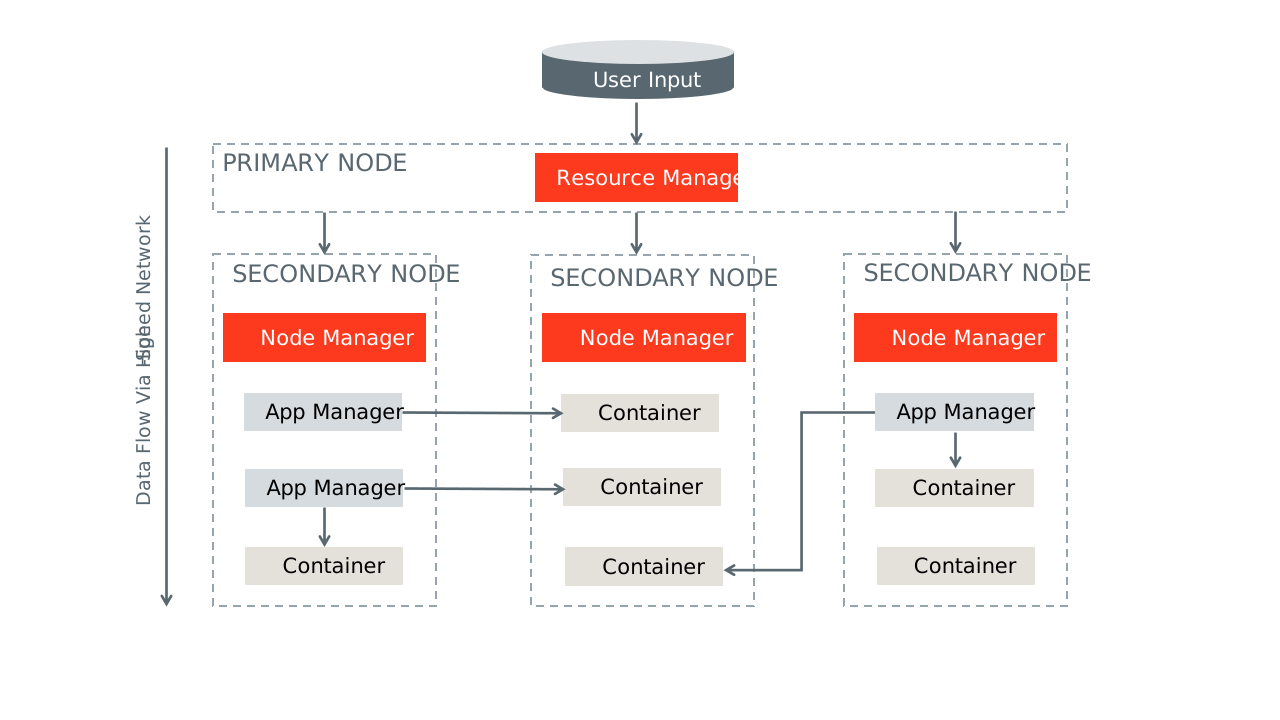 Figure 1
Hadoop Test Bed
A 3-Node cluster was set up for performance benchmarking. The cluster was set up with AmpereOne® M processors.
Equipment Under Test
Cluster Nodes: 3
CPU: AmpereOne® M
Sockets/Node: 1
Cores/Socket: 192
Threads/Socket: 192
CPU Speed: 3200 MHz
Memory Channels: 12
Memory/Node: 768GB
Network Card/Node: 1 x Mellanox ConnectX-6
Storage/Node: 4 x Micron 7450 Gen 4 NVME
Kernel Version: 6.8.0-85: Ubuntu 24.04.3
Hadoop Version: 3.3.6
JDK Version: JDK 11
Hadoop Installation and Cluster Setup
OS Install The majority of modern open-source and enterprise-supported Linux distributions offer full support for the AArch64 architecture. To install your chosen operating system, use the server for Kernel-based Virtual Machine (KVM) console to map or attach the OS installation media, and then follow the standard installation procedure.
Networking Setup Set up a public network on one of the available interfaces for client communication. This can be used to log in to any of the servers and where client communication is needed. Set up a private network for communication between the cluster nodes.
Storage Setup Choose a drive of your choice for OS installation, clear any old partitions, reformat and choose the disk to install the OS. Samsung 960 GB drive (M.2) was chosen for the OS installation in this setup. Add additional high speed NVMe drives for HDFS file system.
Create Hadoop User Create a user named “hadoop” as part of the OS Installation and provide necessary sudo privileges for the user.
Post Install Steps Perform the following post installation steps on all the nodes after the OS installation.
- yum or apt update on the nodes.
- Install packages like dstat, net-tools, nvme-cli, lm-sensors, linux-tools-generic, python, and sysstat for your monitoring needs.
- Set up ssh trust between all the nodes.
- Update /etc/sudoers file for nopasswd for hadoop user.
- Update /etc/security/limits.conf per Appendix.
- Update /etc/sysctl.conf per Appendix.
- Update scaling governor to performance and disable transparent hugepages per Appendix.
- If necessary, make changes to /etc/rc.d to keep the above changes permanent after every reboot.
- Setup NVMe disks as xfs file system for HDFS.
- Zap and format the NVME disks.
- Create a single partition on each of the nvme disks with fdisk or parted.
- Create file system on each of the created partitions as mkfs.xfs -f /dev/nvme[0-n]n1p1.
- Create directories for mounting on root.
- mkdir -p /root/nvme[0-n]1p1.
- Update /etc/fstab with entries to mount the file system. The UUID of each partition for update in fstab, can be extracted from blkid command.
- Change ownership of these directories to ‘hadoop’ user created earlier.
Hadoop Install
Download Hadoop 3.3.6 from the Apache web site and JDK11 for Arm/Aarch64. Extract the tar balls under Hadoop home directory.
Update Hadoop configuration files in ~/hadoop/etc/hadoop/ and environment parameters in .bashrc per Appendix. Depending on the hardware specifications on cores, memory, and disk capacities, these parameters may have to be altered. Update the workers' file to include the set of data nodes.
Run the following commands
hdfs namenode -format scp -r ~/hadoop <datanodes>:~/hadoop ~/hadoop/sbin/start-all.sh
This should start with the NodeManager, ResourceManager, NameNode and DataNode processes on the nodes. Please note that NameNode and Resource Managers are started only on the master node.
Verification of the setup:
- Run the jps command on each node to check the status of the Hadoop daemons.
- Verify that -ls, -put, -du, -mkdir commands can be run on the cluster
Performance Tuning
Hadoop is a complex framework where many components interact across multiple systems. Overall performance is influenced by several distinct factors:
- Platform Settings: This includes configurations at the hardware and operating system levels, such as BIOS settings, specific OS parameters, and the performance of network and disk subsystems.
- Hadoop Configuration: The configuration of the Hadoop software stack itself also plays a critical role in efficiency.
Optimizing these settings typically requires prior experience with Hadoop. It is important to approach performance tuning as an iterative process. It is important to note that performance tuning is an iterative process, and the parameters provided in the Appendix are merely reference values obtained through a few iterations.
Linux Occasionally, conflicts between different subcomponents of a Linux system, such as the networking and disk subsystems, can arise and negatively impact overall performance. The primary objective is to optimize the entire system to achieve optimal disk and network throughput by identifying and resolving any bottlenecks that may emerge during operation.
Network To evaluate the underlying network infrastructure, the iperf utility can be used to conduct stress tests.
Performance optimization involves adjusting specific driver parameters, such as the Transmit (TX) and Receive (RX) ring buffers and the number of interrupt queues, to align them with the CPU cores on the Non-Uniform Memory Access (NUMA) node where the Network Interface Card (NIC) resides. However, if the system's BIOS is already configured in monolithic, these specific kernel-level modifications related to NUMA alignment may not be necessary.
Disks When optimizing performance in a Hadoop environment, administrators should focus on specific disk subsystem parameters:
Aligned Partitions: Partitions should be aligned with the storage's physical block boundaries to maximize I/O efficiency. Utilities like parted can be used to create aligned partitions.
I/O Queue Settings: Parameters such as the queue depth and nr_requests (number of requests) can be fine-tuned via the /sys/block/
Filesystem Mount Options: Utilizing the noatime option in the /etc/fstab file is critical for Hadoop, as it prevents unnecessary disk writes by disabling the recording of file access timestamps.
The fio (flexible I/O tester) tool is highly effective for benchmarking and validating the performance of the disk subsystem after these changes are implemented.
HDFS, YARN and MapReduce
HDFS In HDFS, the primary parameters to consider for data management and resilience are the block size and replication factor.
By default, the HDFS block size is 128 MB. Files are divided into chunks matching this size, which are then distributed across different data nodes. In certain high-performance environments or test beds, a larger block size, such as 512 MB, might be used to optimize throughput for large files. The test bed with AmpereOne® M processor also was set up with 512MB.
The replication factor (defaulting to 3) determines data redundancy. When an application writes data once, HDFS replicates those blocks across the cluster based on this factor, ensuring three identical copies are available for high availability and fault tolerance. Consequently, the total storage space required is directly proportional to the replication factor used (a factor of 3 means you need 3x the raw data size in storage capacity).
HDFS 3.x introduced Erasure Coding (EC) as an alternative to traditional replication. EC significantly reduces storage overhead; for example, a 6+3 EC configuration provides data redundancy comparable to a 3x replication factor but uses substantially less physical storage space. It is important to note, however, that while EC saves storage, it introduces additional computational and network load compared to simple replication. In the described test bed environment, a standard replication factor of 1 was employed
YARN YARN (Yet Another Resource Negotiator) is the resource management framework within the Hadoop ecosystem. It offers two main scheduler options: the Fair scheduler and the Capacity scheduler.
The Fair scheduler (the default configuration) distributes available cluster resources evenly and dynamically among all running applications or jobs over time.
The Capacity scheduler allocates a guaranteed, fixed capacity to each queue, user, or job. By default, behavior of standard configurations, if a queue does not fully utilize its reserved capacity, that excess may remain unused or might be conditionally shared depending on specific configuration parameters.
Key configuration settings for either scheduler involve defining the limits for resource allocation, specifically the minimum allocation, maximum allocation, and incremental "stepping" values for both memory and virtual CPU cores (vcores). We used the default configuration in the testing environment.
MapReduce In the MapReduce framework, a job is broken down into numerous smaller tasks, where each task is designed to have a smaller memory footprint and leverage a single or fewer virtual cores (vcores).
Resource allocation within YARN is determined by these task requirements, considering the total memory available to the YARN Node Manager and the total number of vcores it manages. These configurations can be directly adjusted within the yarn-site.xml file. Reference parameters used in a specific test bed are often provided in an Appendix for guidance.
Benchmark Tools
We used the HiBench benchmarking tool. HiBench is a popular benchmarking suite specifically designed for evaluating the performance of Big Data frameworks, such as Apache Hadoop and Apache Spark. It consists of a set of workload-specific benchmarks that simulate real-world Big Data processing scenarios. For additional information, you can refer to this link.
By running HiBench on the cluster, you can assess and compare their performance in handling various Big Data workloads. The benchmark results can provide insights into factors such as data processing speed, scalability, and resource utilization for each cluster.
Steps to run HiBench on the cluster:
- Download HiBench software from the link above.
- Update hibench.conf file, like scale, profile, parallelism parameters and list of master and slave nodes.
- Run ~HiBench/bin/workloads/micro/terasort/prepare/prepare.sh
- Run ~HiBench/bin/workloads/micro/terasort/Hadoop/run.sh
The above will generate a hibench.report file under the report directory. Further, a bench.log file provides details of the run.
The cluster was using a data set of 3 TB. We measured the total power consumed, CPU power, CPU utilization, and other parameters like disk and network utilization using Grafana, and IPMI tools.
Throughput from the HiBench run was calculated for TeraSort in the following scenarios:
- Hadoop running on a single node on AmpereOne® M to compare with the previous generation of Ampere Altra – 128c.
- Hadoop running on a single node on AmpereOne® M to compare with a 3-node cluster of AmpereOne® M to measure the scalability.
- Hadoop running on a 3-node cluster with 64k page size on AmpereOne® M to compare it with 4k page size on the same processor.
Performance Tests on AmpereOne® M Cluster
TeraSort Performance
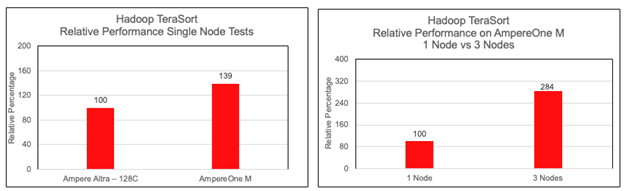 Figure 2 and 3
Using Hibench tool as mentioned above, we ran Hadoop TeraSort tests on one, two and three nodes with AmpereOne® M processors and compared the values we got earlier on Ampere Altra – 128C.
From Figure 2 it is evident that there is a 40% benefit of AmpereOne® M over Ampere Altra – 128C while running Hadoop TeraSort. This increase in performance can be attributed to a newer microarchitecture design, an increase in core count (from 128 to 192) and the 12-channel DDR5 design on AmpereOne® M.
Near-linear scalability was observed when running TeraSort. The output for the 3x nodes configuration was found to be very close to three times the output of a single node.
64k Page Size
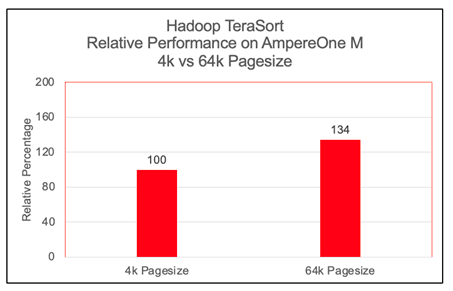 Figure 4
We observed a significant performance increase, approximately 30%, with 64k page size on Arm architecture while running Hadoop TeraSort benchmark. Most modern Linux distributions, support largemem kernels natively. For other systems, building a custom 64k page size kernel is a straightforward procedure that can be implemented with a standard reboot. We have not observed any issues while running Hadoop TeraSort benchmarks on largemem kernels.
Performance per Watt on AmpereOne® M
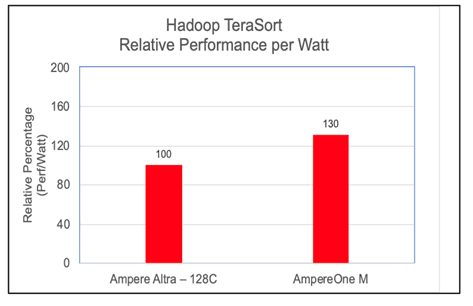 Figure 5
To evaluate the energy efficiency of the cluster, we computed the Performance-per-Watt (Perf/Watt) ratio. This metric is derived by dividing the cluster's measured throughput (megabytes per second) by its total power consumption (watts) during the benchmarking interval. In these assessments, we observed AmpereOne® M performing 30% better over its predecessor on the Hadoop TeraSort benchmark.
OS Metrics while running the benchmark
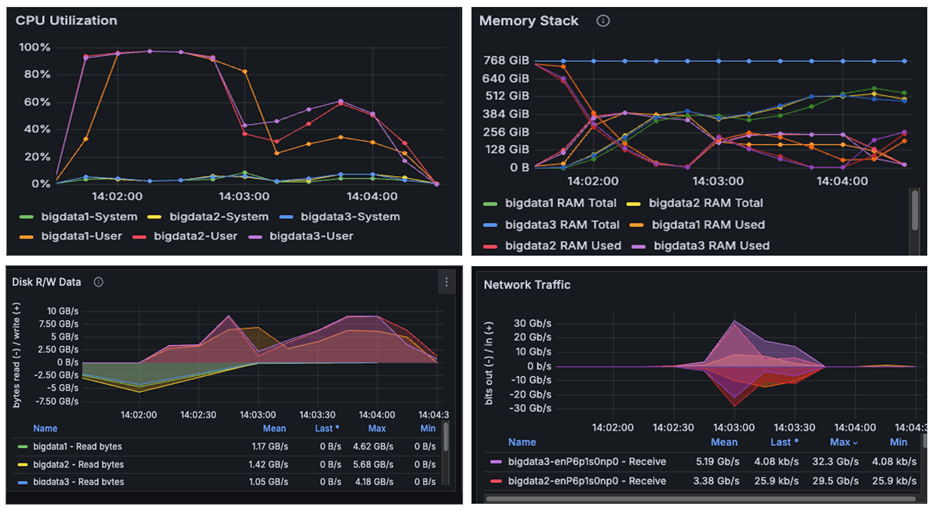 Figure 6
The above image is a snapshot from the Grafana dashboard captured while running the benchmark. The systems achieved maximum CPU utilization while running the TeraSort benchmark using HiBench. We observed disk read/write activity of approximately 10 GB/s and network throughput of 30 GB/s. Since both observed I/O and network throughput were significantly below the cluster's scalable limits, the results confirm that the benchmark successfully pushed the CPUs to their maximum capacity. We observed from the above graphs that AmpereOne® M not only drove disk and network I/O higher than Ampere Altra – 128C, but also completed tasks considerably faster
Power Consumption
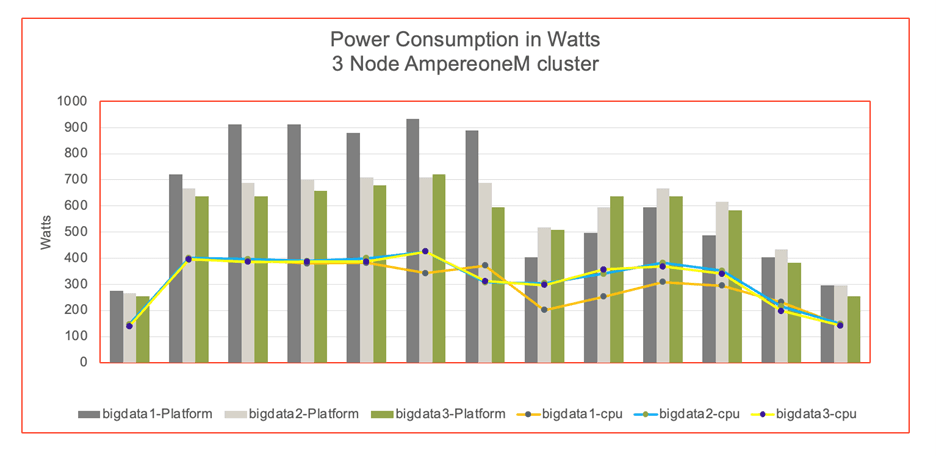 Figure 7
The graph illustrates the power consumption of cluster nodes, platform and CPU. The power was measured by IPMI tool during the benchmark run. The data reveals that the AmpereOne® M cluster consumed more absolute power than the Ampere Altra – 128C. However, this increased power usage correlated with a higher TeraSort throughput on the AmpereOne® M system. AmpereOne® M cluster delivers a better performance per watt (Figure 5).
Conclusions
This paper presents a reference architecture for deploying Hadoop on a multi-node cluster powered by AmpereOne® M processors and compares the results against a prior deployment on Ampere Altra – 128C processors.
The latest TeraSort benchmark results validate the findings of earlier studies, demonstrating that Arm-based processors provide a compelling, high-performance alternative to traditional x86 systems for big-data workloads.
Building on this foundation, the evaluation of the 12‑channel DDR5 AmpereOne® M platform shows measurable improvements not only in raw throughput but also in performance-per-watt compared to previous generation processors. The improvements confirm that the AmpereOne® M is a purpose-built platform designed for modern data centers and enterprises that prioritize both performance and energy efficiency.
AmpereOne® M addresses the core requirements of today’s organizations: performance, efficiency, and scalability.
Big Data workloads demand significant compute capacity and persistent storage, and by deploying these applications on Ampere processors, organizations benefit from both scale-up and scale-out architectures. This approach enables a higher density per rack, reduces power consumption and delivers consistent throughput at scale.
To learn more about our developer efforts and find best practices, visit Ampere’s Developer Center and join the conversation in the Ampere Developer Community.
Appendix
/etc/sysctl.conf
kernel.pid_max = 4194303 fs.aio-max-nr = 1048576 net.ipv4.conf.default.rp_filter=1 net.ipv4.tcp_timestamps=0 net.ipv4.tcp_sack = 1 net.core.netdev_max_backlog = 25000 net.core.rmem_max = 2147483647 net.core.wmem_max = 2147483647 net.core.rmem_default = 33554431 net.core.wmem_default = 33554432 net.core.optmem_max = 40960 net.ipv4.tcp_rmem =8192 33554432 2147483647 net.ipv4.tcp_wmem =8192 33554432 2147483647 net.ipv4.tcp_low_latency=1 net.ipv4.tcp_adv_win_scale=1 net.ipv6.conf.all.disable_ipv6 = 1 net.ipv6.conf.default.disable_ipv6 = 1 net.ipv4.conf.all.arp_filter=1 net.ipv4.tcp_retries2=5 net.ipv6.conf.lo.disable_ipv6 = 1 net.core.somaxconn = 65535 #memory cache settings vm.swappiness=1 vm.overcommit_memory=0 vm.dirty_background_ratio=2
/etc/security/limits.conf
* soft nofile 65536 * hard nofile 65536 * soft nproc 65536 * hard nproc 65536
Miscellaneous Kernel changes
#Disable Transparent Huge Page defrag echo never> /sys/kernel/mm/transparent_hugepage/defrag echo never > /sys/kernel/mm/transparent_hugepage/enabled #MTU 9000 for 100Gb Private interface and CPU governor on performance mode ifconfig enP6p1s0np0 mtu 9000 up cpupower frequency-set --governor performance
.bashrc file
export JAVA_HOME=/home/hadoop/jdk export JRE_HOME=$JAVA_HOME/jre export CLASSPATH=.:$JAVA_HOME/lib:$JRE_HOME/lib:$classpath export PATH=$PATH:$JAVA_HOME/bin:$JRE_HOME/bin #HADOOP_HOME export HADOOP_HOME=/home/hadoop/hadoop export HADOOP_INSTALL=$HADOOP_HOME export HADOOP_MAPRED_HOME=$HADOOP_HOME export HADOOP_COMMON_HOME=$HADOOP_HOME export HADOOP_HDFS_HOME=$HADOOP_HOME export YARN_HOME=$HADOOP_HOME export PATH=$HADOOP_HOME/bin:$HADOOP_HOME/sbin:$PATH export PATH=$PATH:/home/hadoop/.local/bin
core-site.xml
<configuration> <property> <name>fs.defaultFS</name> <value>hdfs://<server1>:9000</value> </property> <property> <name>hadoop.tmp.dir</name> <value>/data/data1/hadoop, /data/data2/hadoop, /data/data3/hadoop, /data/data4/hadoop </value> </property> <property> <name>io.native.lib.available</name> <value>true</value> </property> <property> <name>io.compression.codecs</name> <value>org.apache.hadoop.io.compress.GzipCodec, org.apache.hadoop.io.compress.DefaultCodec, org.apache.hadoop.io.compress.BZip2Codec, com.hadoop.compression.lzo.LzoCodec, com.hadoop.compression.lzo.LzopCodec, org.apache.hadoop.io.compress.SnappyCodec</value> </property> <property> <name>io.compression.codec.snappy.class</name> <value>org.apache.hadoop.io.compress.SnappyCodec</value> </property> </configuration>
hdfs-site.xml
<configuration> <property> <name>dfs.replication</name> <value>1</value> </property> <property> <name>dfs.blocksize</name> <value>536870912</value> </property> <property> <name>dfs.namenode.name.dir</name> <value>file:/home/hadoop/hadoop_store/hdfs/namenode</value> </property> <property> <name>dfs.datanode.data.dir</name> <value>/data/data1/hadoop, /data/data2/hadoop, /data/data3/hadoop, /data/data4/hadoop </value> </property> <property> <name>dfs.client.read.shortcircuit</name> <value>true</value> </property> <property> <name>dfs.domain.socket.path</name> <value>/var/lib/hadoop-hdfs/dn_socket</value> </property> </configuration>
yarn-site.xml
<configuration> <!-- Site specific YARN configuration properties --> <property> <name>yarn.nodemanager.aux-services</name> <value>mapreduce_shuffle</value> </property> <property> <name>yarn.resourcemanager.hostname</name> <value><server1></value> </property> <property> <name>yarn.scheduler.minimum-allocation-mb</name> <value>1024</value> </property> <property> <name>yarn.scheduler.maximum-allocation-mb</name> <value>81920</value> </property> <property> <name>yarn.scheduler.minimum-allocation-vcores</name> <value>1</value> </property> <property> <name>yarn.scheduler.maximum-allocation-vcores</name> <value>186</value> </property> <property> <name>yarn.nodemanager.vmem-pmem-ratio</name> <value>4</value> </property> <property> <name>yarn.nodemanager.resource.memory-mb</name> <value>737280</value> </property> <property> <name>yarn.nodemanager.resource.cpu-vcores</name> <value>186</value> </property> <property> <name>yarn.log-aggregation-enable</name> <value>true</value> </property> </configuration>
mapred-site.xml
<configuration> <property> <name>mapreduce.framework.name</name> <value>yarn</value> </property> <property> <name>yarn.app.mapreduce.am.env</name> <value>HADOOP_MAPRED_HOME=$HADOOP_HOME</value> </property> <property> <name>mapreduce.map.env</name> <value>HADOOP_MAPRED_HOME=$HADOOP_HOME, LD_LIBRARY_PATH=$LD_LIBRARY_PATH </value> </property> <property> <name>mapreduce.reduce.env</name> <value>HADOOP_MAPRED_HOME=$HADOOP_HOME</value> </property> <property> <name>mapreduce.application.classpath</name> <value>$HADOOP_MAPRED_HOME/share/hadoop/mapreduce/*, $HADOOP_MAPRED_HOME/share/hadoop/mapreduce/lib-examples/*, $HADOOP_MAPRED_HOME/share/hadoop/mapreduce/sources/*, $HADOOP_MAPRED_HOME/share/hadoop/common/*, $HADOOP_MAPRED_HOME/share/hadoop/common/lib/*, $HADOOP_MAPRED_HOME/share/hadoop/yarn/*, $HADOOP_MAPRED_HOME/share/hadoop/yarn/lib/*, $HADOOP_MAPRED_HOME/share/hadoop/hdfs/*, $HADOOP_MAPRED_HOME/share/hadoop/hdfs/lib/*</value> </property> <property> <name>mapreduce.jobhistory.address</name> <value><server1>:10020</value> </property> <property> <name>mapreduce.jobhistory.webapp.address</name> <value><server1>:19888</value> </property> <property> <name>mapreduce.map.memory.mb</name> <value>2048</value> </property> <property> <name>mapreduce.map.cpu.vcore</name> <value>1</value> </property> <property> <name>mapreduce.reduce.memory.mb</name> <value>4096</value> </property> <property> <name>mapreduce.reduce.cpu.vcore</name> <value>1</value> </property> <property> <name>mapreduce.map.java.opts</name> <value> -Djava.net.preferIPv4Stack=true -Xmx2g -XX:+UseParallelGC -XX:ParallelGCThreads=32 -Xlog:gc*:stdout</value> </property> <property> <name>mapreduce.reduce.java.opts</name> <value> -Djava.net.preferIPv4Stack=true -Xmx3g -XX:+UseParallelGC -XX:ParallelGCThreads=32 -Xlog:gc*:stdout</value> </property> <property> <name>mapreduce.task.timeout</name> <value>6000000</value> </property> <property> <name>mapreduce.map.output.compress</name> <value>true</value> </property> <property> <name>mapreduce.map.output.compress.codec</name> <value>org.apache.hadoop.io.compress.SnappyCodec</value> </property> <property> <name>mapreduce.output.fileoutputformat.compress</name> <value>true</value> </property> <property> <name>mapreduce.output.fileoutputformat.compress.type</name> <value>BLOCK</value> </property> <property> <name>mapreduce.output.fileoutputformat.compress.codec</name> <value>org.apache.hadoop.io.compress.SnappyCodec</value> </property> <property> <name>mapreduce.reduce.shuffle.parallelcopies</name> <value>32</value> </property> <property> <name>mapred.reduce.parallel.copies</name> <value>32</value> </property> </configuration>
Related Content
Ampere Computing LLC
4655 Great America Parkway Suite 601
Santa Clara, CA 95054