
Ampere® Perfkit Benchmarker (APB) Tutorial
Ampere® Perfkit Benchmarker (APB) Tutorial
The Ampere® Perfkit Benchmarker (APB) is an automated framework that ensures repeatable benchmarking of cloud-native and AI/ML workloads on heterogeneous hardware. It is part of the Ampere Performance Toolkit (APT), which is an open-source suite of specialized tools for profiling, benchmarking, and optimizing software on Arm64 processors.
APB is a fork of Google’s PerfKit Benchmarker (PKB), with representative real-world benchmarks for cloud native applications, such as databases (Postgres, Cassandra, Redis, etc.), web servers (Nginx), AI workloads (LLMs – Qwen, Llama and others, DLRM, ResNet, etc.)
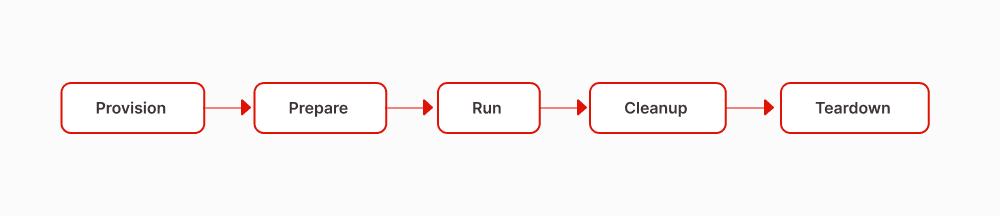
It automates and standardizes the benchmarking cycle – provisioning infrastructure, deploying software, executing benchmarks, calculating and reporting performance metrics, cleaning up, and tearing resources down.
APB supports platform architectures like bare metal and cloud environments (Google Cloud, Microsoft Azure, Oracle Cloud) and dynamic environments like different Linux distros, containers and Kubernetes.
This tutorial walks through the benchmarking methodology, instructions to setup and run APB, data-driven performance evaluation, best practices for reproducibility, and result analysis.
Architecture
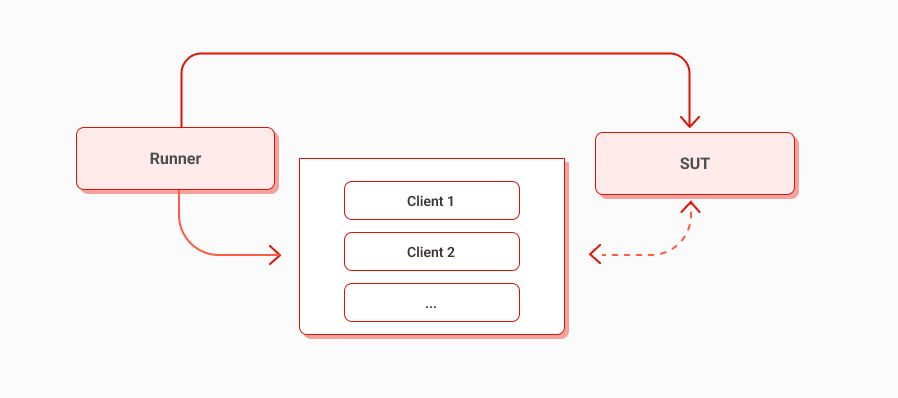
APB harness requires a “Runner” which orchestrates one or more client workloads against a dedicated System Under Test (SUT).
APB setup requires dedicated machines shown below.
- Runner (orchestrator): The Runner is the system where APB is deployed, responsible for environment setup, starting the benchmark, controlling test parameters, and coordinating benchmark phases.
- Client/s (load generators): The benchmark provisions, sets up one or more clients (Client1, Client2, …) as per configuration file. Clients and load generator applications will run on this system.
- SUT (System Under Test): The SUT is the target server or platform under evaluation where the application to be benchmarked is deployed and configured.
Requirements and Installations
- Tool Dependencies
The APB Runner system requires Python >=3.11, pip for package management and a virtual environment for dependencies
(Python versions >=3.13 may work with APB, however compatibility is not guaranteed and behavior may vary.)
2. Prerequisites
For Runner, Clients and SUT to have seamless communication, ensure a passwordless SSH connection is setup from Runner to Clients/SUT.
- Setup passwordless SSH from the Runner -> SUT/Client(s)
- Copy the public key of the Runner System, usually located at ~/.ssh/id_rsa.pub.
- Log into the System Under Test (SUT) and the Client (SC) as root and paste the public key into ~/.ssh/authorized_keys.
- Test the passwordless ssh connection to the System Under Test (SUT) and the System Client (SC), say, ssh root@system_under_test and it shouldn't prompt for a password.
- Reference(s): see the SSH Academy Guide
- Example path to private key on the Runner: /home/apb_runner/.ssh/apb_key
- Setup passwordless sudo for the user associated with the SSH key on the SUT/Client(s)
- Reference(s): see the answer to this post on Server Fault
- Example user: apb_user
3. Software Dependencies
Clone APB on the Runner system in the directory of your choice.
Like this tutorial, the README.md present in the top-level directory contains all instructions to setup and get started with running APB
$ git clone https://github.com/AmpereComputing/ampere-perfkit-benchmarker
APB Requirements and Setup
EITHER
A) Use the setup script at APB repository’s root directory $ source setup.sh
- The setup script will:
- Detect if Python >=3.11.x is installed
- Create a virtual environment
- Install all dependencies and requirements for APB
- Start the virtual environment
OR
B) Setup APB Manually with a Virtual Environment
$ sudo dnf install python3.12 $ python3.12 -m venv venv $ source venv/bin/activate $ python3.12 -m pip install --upgrade pip $ pip install -r requirements.txt
Running APB
Ensure the virtual environment is active and run the benchmark command from the root of the APB project directory.
The benchmark follows five phases as shown below.
Command to view all available flags related to a benchmark, e.g.
./pkb.py --helpmatch=ampere | grep -A 2 <benchmark_name>
Command to run, e.g.
./pkb.py --benchmarks=<benchmark_name> --benchmark_config_file=<path_to_config>
- The benchmark name must match the name defined in the YAML config
- The path to the configuration file in the run command can be relative or absolute
- Each YAML config file represents a workload configuration for a certain system(s) and environment
Additional useful flags:
- To execute a benchmark run n times, use the iterations flag as --run_stage_iterations=
- To execute benchmark steps, use the stage flag as --run_stage=<provision,prepare,run,cleanup,teardown>
Example: To setup benchmark in a standard manner, one can use APB prepare stage to setup and run stage to test independently.
- Pass -run_stage=provision,prepare
- Note generated run_uri
- Use --run_stage=run --run_uri=<run_uri> to repeat testing for manual debug purposes
- Use --run_stage=cleanup,teardown --run_uri<run_uri> to cleanup and teardown benchmark
Understanding APB Results
APB generates a result directory named as the run_uri at temporary location of runner system (/tmp/perfkitbenchmarker/runs). The results directory contains:
- Performance benchmark metrics such as throughput, latencies in JSON, CSV formats.
- System and benchmark configurations for traceability.
- APB run logs for debugging and tracking purposes.
Case Study: LLM Benchmarking with APB
LLMs are often benchmarked for accuracy, but in production the important considerations are speed and efficiency – how fast responses arrive i.e latency (Time to First Token – TTFT, Time per Output Token – TPOT, etc.) and how much the server can process/generate i.e. throughput (tokens generated per second).
LLMs have various parameters and knobs which form an interplay affecting throughput and latencies metrics. For a given prompt size, output response size, when we increase batch size, we increase throughput because the processor can process multiple prompt sequences in parallel. However, batching can increase TTFT, and tail latency can worsen depending on scheduling and load.
APB enables a standard and methodical approach to benchmarking inference performance for a model using llama.cpp. It offers a simple but reproducible way to configure, tune workload, benchmark with input/output sizes, batch sizes, number of parallel inference processes, and observe how it drives and affects throughput and latency.
LLM Benchmark Setup and Run
Once APB is cloned and setup locally, update LLM workload YAML at path “ampere/pkb/configs”.
- Update server flags in it as below:
- ip_address is the SUT system IP
- user_name would be the one with which you are accessing the SUT, example - root.
- ssh_private_key is the path of your ssh private key on runner system
ampere_llama_benchmark_model_names: ["llama-3.1-8B-Q8R16.gguf"] ampere_llama_models_url: 'https://huggingface.co/AmpereComputing/llama-3.1-8b-gguf/resolve/main' ampere_docker_image: 'llama.cpp' ampere_docker_image_repo: 'amperecomputingai' ampere_docker_image_version: '3.4.2-ampereone'
- Llama.cpp configurations of threads (compute cores) per model, batch size (no. of parallel prompts), prompt size and output tokens are set using below flags
ampere_llama_benchmark_threads_per_process: [6] ampere_llama_benchmark_batch_size: [64] ampere_llama_benchmark_prompt_size: [512] ampere_llama_benchmark_output_tokens: 256 ampere_llama_benchmark_threads_range: '0-191'
- Run the Llama Benchmark as:
./pkb.py --benchmarks=ampere_llama_benchmark --benchmark_config_file=ampere/pkb/configs/example_llm_on_AmpereOneM.yml
Results of benchmark run are generated in /tmp/perfkitbenchmarker/runs. On a successful run, we see below result at the end. This run uri identified directory includes run logs, results in JSON format perfkitbenchmarker_results.json and a CSV results file for LLM workloads.
As part of results, LLM benchmark outputs metrics such as prompt processing and token generation throughputs, Time to First Token, Time per Output Token and End to End latencies.
2026-06-11 08:25:48,189 ba74c8e8 MainThread pkb.py:1649 INFO Benchmark run statuses: ---------------------------------------------------------------------------- Name UID Status Failed Substatus ---------------------------------------------------------------------------- ampere_llama_benchmark ampere_llama_benchmark0 SUCCEEDED ---------------------------------------------------------------------------- Success rate: 100.00% (1/1) 2026-06-11 08:25:48,189 ba74c8e8 MainThread pkb.py:1651 INFO Complete logs can be found at: /tmp/perfkitbenchmarker/runs/ba74c8e8/pkb.log 2026-06-11 08:25:48,189 ba74c8e8 MainThread pkb.py:1652 INFO Completion statuses can be found at: /tmp/perfkitbenchmarker/runs/ba74c8e8/completion_statuses.json 2026-06-11 08:25:48,189 ba74c8e8 MainThread pkb.py:1658 INFO To run again with this setup, please use --run_uri=ba74c8e8 2026-06-11 08:25:48,190 ba74c8e8 MainThread pkb.py:1686 INFO PKB exiting with return_code 0
Conclusions
A disciplined benchmarking workflow is critical when multiple teams need to validate performance claims with confidence. Ampere Perfkit Benchmarker (APB) provides a repeatable, infrastructure and configuration-aware, and automation-first approach to measuring ML/LLM and cloud-native workload performance.
While working with customers and partners, this translates directly into practical benefits - it supports customer validation of ‘what was measured and why’, enables technical alignment by standardizing workload configs, tunings, assumptions, and environments across teams, and strengthens stakeholder engagement by turning performance discussion into transparent, shareable results. By making performance evaluation reproducible, APB helps teams move accurately and faster from performance analysis to data-driven decisions with less ambiguity.
Related Content
Ampere Computing LLC
4655 Great America Parkway Suite 601
Santa Clara, CA 95054